3D Website Design · 2026-10-16 · 5 min read
Interactive 3D Website Templates: MR. DAB and ONI RONIN
Two character-led website concepts show how motion can serve different jobs. Watch the short demos, explore each live page, then use this practical checklist to choose the right starting point for your own project.
Written by Amanjot Singh, founder of Scrollhaus, and edited by the Scrollhaus editorial team. Sources and methodology are documented in the article.
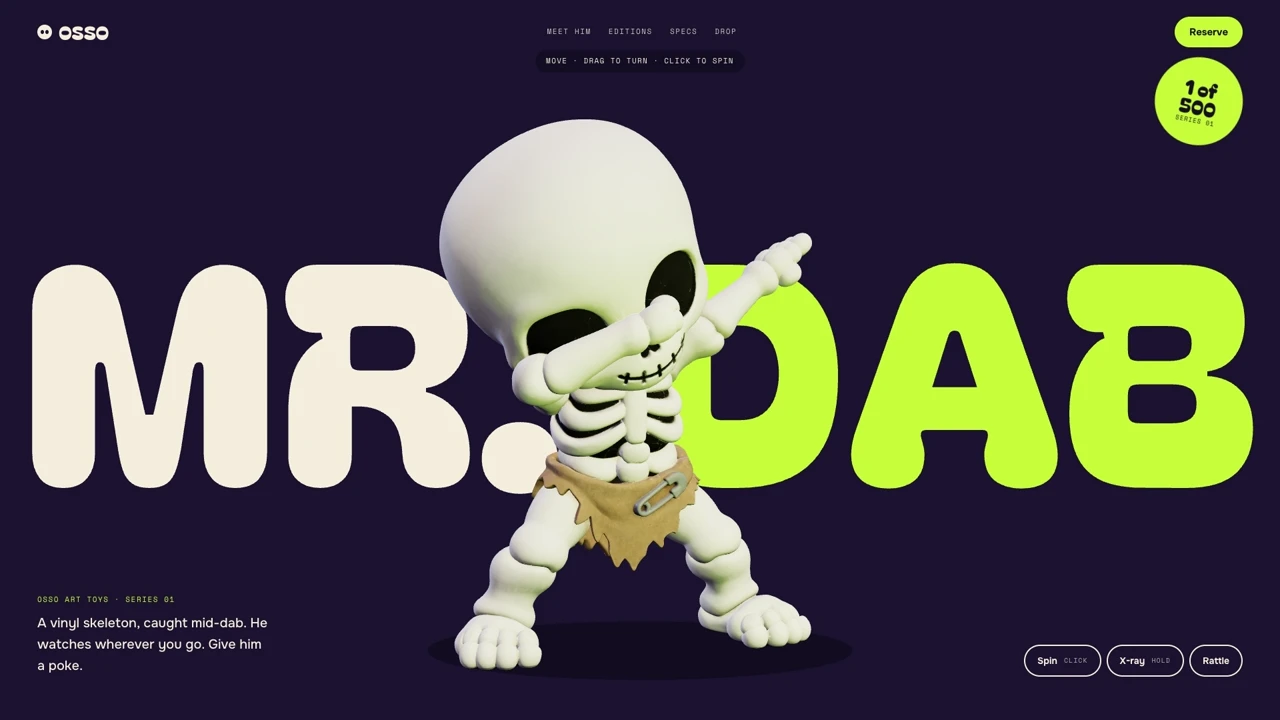
Choose by purpose: MR. DAB is a playful hero for a character or product with a light, memorable personality. ONI RONIN is a cinematic storytelling page built around scenes and pacing. They solve different problems; picking the style that matches the offer matters more than adding the most animation.
MR. DAB: a playful, character-led website
The MR. DAB demo opens with a 3D character against oversized, high-contrast lettering. The design makes a single figure the focal point, then reveals supporting details as the visitor scrolls. It suits a creative campaign, collectible, entertainment property, or limited-edition product where the character itself is the message.
Open the live MR. DAB website or watch the full 41-second demo. Move the pointer, then try the page on a phone. The interaction should still tell a coherent story without hover.
ONI RONIN: cinematic scroll storytelling
ONI RONIN puts a character and world first. Large visual scenes, a limited palette, and deliberate section transitions create a more dramatic pace. That is a stronger direction for a game, film, fictional universe, or editorial campaign than for a product page that needs quick feature comparisons.
Open the live ONI RONIN website or watch the full 42-second demo. Follow the sequence all the way down: the section order, not just the first image, carries the narrative.
How to adapt a 3D website template without losing the motion
- Pick one visual job. Decide whether the character is selling a product, guiding a story, or simply establishing atmosphere.
- Keep a real content path. Write the headline, explanation, proof, and next action as HTML text. Motion should support those elements rather than replace them.
- Copy the available build instructions. Use the entry's prompt or source as a starting point, then replace the brand, media and words with assets you can use commercially. The public demos are references, not a promise that one paste will reproduce every frame.
- Test input methods. Scroll and use the page with a mouse, keyboard, touch and reduced-motion settings. No key message should exist only in a hover state.
- Measure the finished page. Keep a useful poster visible while media loads, avoid fetching the entire video before it is needed, and check real mobile behavior. The scroll animation performance guide explains the trade-offs.
For more directions, compare the 3D website examples and the interactive 3D product landing page guide. If you want to inspect working free source before choosing a plan, start with the Scrollhaus free GitHub sampler; these two demos are linked there as motion studies, while their source is outside that free repository.
Frequently asked questions
Can I preview these 3D website templates before paying?
Yes. The live MR. DAB and ONI RONIN pages can be opened and scrolled before choosing a build. Access to prompts and source depends on the individual entry and your plan.
Will copying a prompt recreate the demo exactly?
Treat the demo as a visual reference. A first AI-generated build may differ, especially in 3D media, timing, and responsive behavior. Test and refine the implementation before publishing.
Explore animated website templates at Scrollhaus →
Need help with a template, account, or project? Email admin@scrollhaus.ai.