Website Design Guides · Published · 5 min read
Build a Scroll-Triggered Portfolio Website
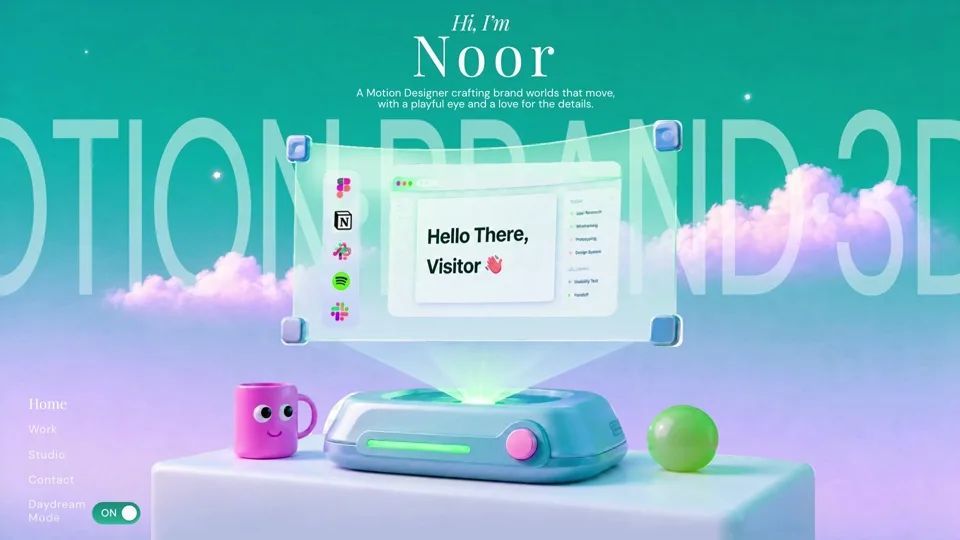
Build an animated portfolio around three case studies. The free Noor hero offers a working starting point, and the copyable code below gives project images a short reveal when readers reach each case study.
Published by Amanjot Singh, founder of Scrollhaus. AI-assisted editorial work; product context, sources and corrections are documented in our editorial methodology.
Key takeaways
- Use a short entrance for project images and keep project text readable from the start.
- Give case studies their own links and a consistent problem, role and outcome structure.
- Check keyboard navigation, reduced motion and the first scroll on a phone.
Start with a live portfolio hero
Open the free Noor portfolio example to try the introduction and portrait composition. Open Noor in the Scrollhaus catalogue for its build prompt. Add a project index below that hero with one title, one result and one linked cover per case study. For a broader choice of hero styles, see the scroll-driven hero patterns.
Plan three case studies with direct links
Choose three jobs that show a range of problems you can solve. For each job, publish a stable URL, a short description of your role, two or three annotated screenshots, and an outcome you can support. Use a simple “View project” link on every card and keep a contact link near the end of the index.
Copy a scroll-triggered image reveal
Add the work-image class to a project image or its figure. The image remains visible by default. Where scroll-driven CSS is supported and full motion is allowed, the image moves 12 pixels into place as it enters the viewport. The surrounding text and links stay in normal document flow.
@supports (animation-timeline: view()) {
  @media (prefers-reduced-motion: no-preference) {
    .work-image {
      animation: work-enter 1s ease-out both;
      animation-timeline: view();
      animation-range: entry 0% entry 75%;
    }
    @keyframes work-enter {
      from { transform: translateY(12px); opacity: 0.65; }
      to { transform: translateY(0); opacity: 1; }
    }
  }
}
Set each image’s width and height in the markup, and use the right crop for the card. If your site uses a nested scrolling container, test the animation inside that container. See MDN’s animation-timeline reference and the reduced-motion reference.
Give your AI builder this implementation brief
Build a portfolio with an introductory hero, three case studies and a contact section.
Retain the reference hero's hierarchy and replace its portrait, colors and text with my files.
Create a direct link for each case study and use real project titles and images.
Apply the supplied scroll reveal to project images only.
Keep all text and navigation available with reduced motion and with JavaScript disabled.
Test desktop and a 390 px phone viewport, including direct case-study links and keyboard focus.
Check the first scroll on a real phone
Open the portfolio in a fresh browser. Scroll down and back up, make sure the image never covers a headline or button, and verify that the case study URLs open directly. Switch on reduced motion to check the static presentation. If the first image is slow, keep it visible early and prioritize it ahead of off-screen gallery media. See the scroll animation performance guide for heavier scenes.
Frequently asked questions
How do I add a scroll reveal to an existing portfolio?
Put the effect on a featured image wrapper or other small visual element first. Keep the title, summary and project link in normal document flow, and test the page with reduced motion enabled.
Can I use this starting point without a recorded video?
Yes. Use your own project stills or screenshots. The example animates the image element at its existing size and works with ordinary image markup.
Browse Scrollhaus website designs and build resources →
Need help with a template, account, or project? Email admin@scrollhaus.ai.