AI Website Templates · Published · 5 min read
3D WebGL Scene Prompts for Lovable, Bolt & Claude Code
Asking an AI builder for “a cool 3D hero” usually returns a spinning cube. A good WebGL scene prompt makes the decisions for it. Here is the seven-part structure we use, with three complete prompts you can paste today.
Published by Amanjot Singh, founder of Scrollhaus. AI-assisted editorial work; product context, sources and corrections are documented in our editorial methodology.
Disclosure: Scrollhaus publishes this guide and sells website templates with build prompts. Statements about other products come from their public websites as of November 2026.
Why 3D scene prompts usually fail
Ask an AI builder for "a cool 3D hero with a glass object" and you will usually get a spinning cube under default lighting. The model is not short of skill. It is short of decisions: which renderer settings, which material values, where the camera sits, what moves on scroll and what happens on a phone. A good WebGL scene prompt makes those decisions for it.
Prompt libraries such as GetLayers and MotionSites sell 3D scene prompts for this reason. Below is the structure we use for the Scrollhaus 3D templates, with three complete prompts you can paste into Lovable, Bolt, Cursor or Claude Code.
The seven parts of a WebGL scene prompt
- Stack: React + TypeScript + Vite + Tailwind with three.js (pin a version), and where the scene file lives.
- Renderer: tone mapping, pixel-ratio cap, environment lighting, background colour.
- Hero object: geometry, material values and anything inside or behind it.
- Camera and motion: field of view, position, idle motion, pointer response, drag behaviour.
- Scroll choreography: keyframes for each section, with easing.
- Interface: the HTML that sits over the canvas. Every word stays real text.
- Phones and fallbacks: lower detail, different keyframes, reduced motion, no-WebGL poster.
Prompt 1: refractive glass hero
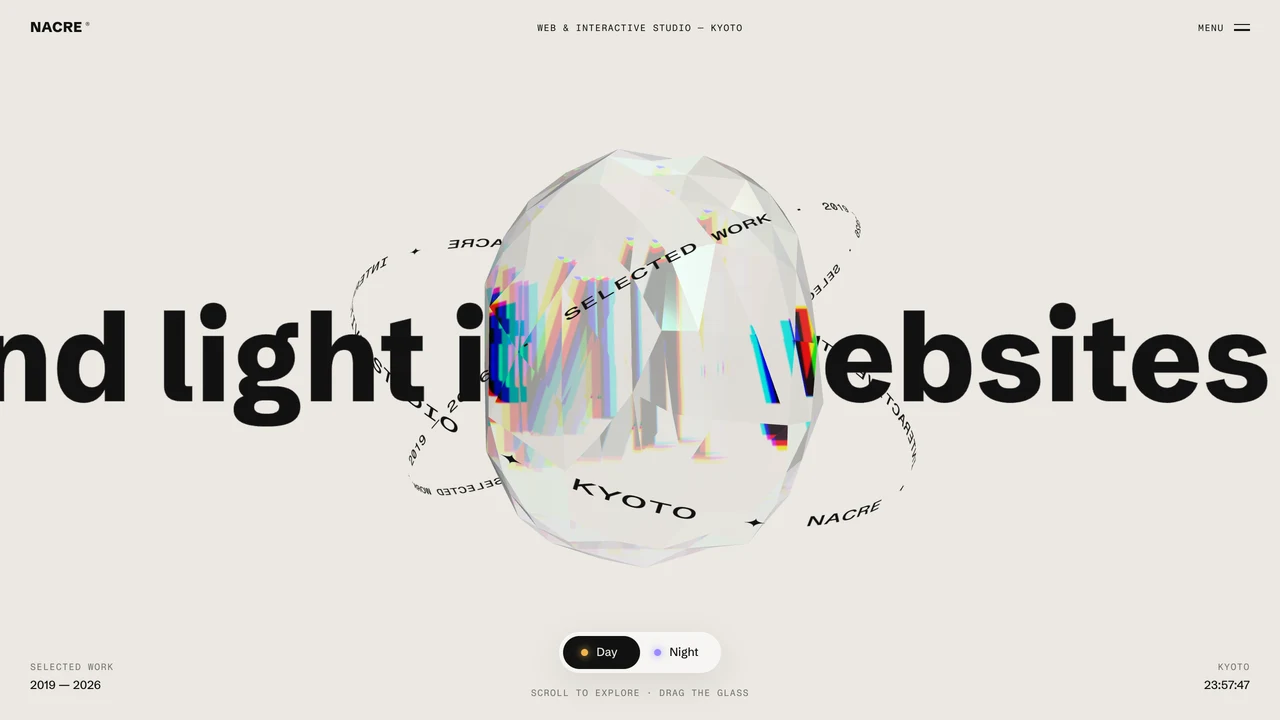
Build a studio homepage in React + TypeScript + Vite + Tailwind with three.js 0.170 in src/three/glass.ts.
Renderer: NeutralToneMapping, pixel ratio max 2 (1.5 on phones), environment = PMREM of RoomEnvironment, page bg #ebe8e2.
Behind the object, draw a giant line of type ("We bend light into websites —") on a canvas texture on an opaque plane at z -2.2 that scrolls as a marquee.
Hero object: IcosahedronGeometry(1.25, 3) squared off per axis, MeshPhysicalMaterial transmission 1, thickness 1.8, ior 1.42, dispersion 7, iridescence 0.9, roughness 0.07, flatShading.
Camera: fov 32 at z 9. Auto-spin; mouse drag throws it with inertia; tilt toward the pointer (lerp 0.05).
Scroll: move the object right for the About section, left for Work, centre for Contact, scaled to 0.6.
Phones (≤820px): detail 2, park the object small at top right after the hero. Reduced motion: no spin.
Keep all copy as HTML. Do not output one giant HTML file.
This is the core of NACRE, which you can scroll and drag before building.
Prompt 2: night landscape fly-through
Build a full-screen scroll hero with three.js 0.170: EffectComposer, UnrealBloomPass (strength .62, radius .45, threshold .32), OutputPass.
Terrain: one height function H(x,z) of 4-octave fbm along a winding valley path, drawn only as glowing contour lines (fwidth anti-aliasing).
Points: 17,000 flowers (7,500 on phones) as point sprites that open near a lantern that follows the pointer (raymarched hit on H).
Scroll over a 760vh runway moves the camera along the valley from dusk to dawn, interpolating sky and fog colours.
Interface: headline bottom-left, live readouts right, three chapter captions, a finale on the dawn sky.
Pause rendering when the tab is hidden; reduced motion removes smoothing.
See it running in MOONWORT.
Prompt 3: product turntable for ecommerce
Build a product landing page with React Three Fiber and drei. Load /models/product.glb (Draco compressed, under 3 MB) with useGLTF.
Lighting: Environment preset "studio", ContactShadows under the model, ACES tone mapping.
The model turns slowly; dragging rotates it (OrbitControls, no zoom, polar angle limited). Clicking a colour swatch swaps the material colour with a 400ms tween.
Scroll pins the canvas for 300vh and rotates the camera 180° while three feature captions fade in.
Show a poster image until the model loads. On phones disable shadows and cap pixel ratio at 1.5.
Making your scene prompt reliable
- Give numbers, not adjectives. "Roughness 0.07" beats "very glossy".
- Name files and folders so the AI keeps the scene separate from the UI.
- Ask for one step at a time: scene first, then scroll, then interface, then phones.
- Include a reference the AI can't misread: a live preview of the result.
Prompts with live previews
Every Scrollhaus 3D website template includes a written build spec like the ones above, matched to a live page you can try first. Compare approaches in MotionSites vs GetLayers vs Scrollhaus, and read the browser-based 3D performance guide before shipping.
Frequently asked questions
What should a 3D website prompt include?
The stack and three.js version, renderer settings, the hero object and its material values, camera and motion, scroll keyframes, the HTML interface and phone fallbacks.
Can Lovable or Bolt build three.js scenes?
Yes. Both can generate three.js or React Three Fiber code; precise numbers and a live reference make the result far closer to what you want.
Where can I find 3D scene prompts?
Prompt libraries such as GetLayers and MotionSites sell them. Scrollhaus pairs each written build spec with a live 3D website you can try first.
Explore animated website templates at Scrollhaus →
Need help with a template, account, or project? Email admin@scrollhaus.ai.