AI Website Guides · Published · 5 min read
Browser-Based 3D Websites: Fast, High-Fidelity 3D on the Web (2026)
Web-based 3D now runs on every phone, but a scene that is smooth on a laptop can stall a mid-range device. This guide compares the three ways to put 3D in a page and gives the performance budget we use for high-fidelity 3D websites.
Published by Amanjot Singh, founder of Scrollhaus. AI-assisted editorial work; product context, sources and corrections are documented in our editorial methodology.
Disclosure: Scrollhaus publishes this guide and builds the 3D websites linked from it. Technical claims refer to public browser and three.js documentation; numbers are budgets we use when shipping our own pages, not guarantees.
What browser-based 3D actually means
Browser-based 3D (often searched as web 3D or web-based 3D) is a scene rendered on the visitor's own graphics card inside a normal web page: no plugin, no app install, no video file pretending to be interactive. Since WebGL 2 shipped in every major browser, and WebGPU began shipping in Chrome, Edge and Safari, a website can draw glass, particles, terrain or a product model at 60 frames per second and let the visitor turn it with a finger.
That freedom is also the trap. A 3D scene that runs smoothly on a developer's laptop can drain a mid-range phone in seconds. A fast, high-fidelity 3D website is mostly a question of budgets, so this guide starts there.
Three ways to put 3D in a web page
| Approach | Fidelity | Cost on phones | Best for |
|---|---|---|---|
| Real-time WebGL (three.js, React Three Fiber, Babylon.js) | Highest: lighting, refraction, physics and input all live | Medium to high; needs a budget | Product viewers, playful heroes, configurators |
| Pre-rendered frame sequence on a canvas | Film quality; camera path fixed | Low GPU cost, higher download | Cinematic scroll stories, launches |
| CSS 3D transforms and parallax layers | Depth without a scene | Very low | Cards, galleries, typographic depth |
Many of the best 3D websites mix them: a real-time object in the hero, a canvas frame sequence for the story, and CSS depth for the cards below.
A performance budget for 3D on the web
These are the limits we hold Scrollhaus 3D templates to before they ship. Treat them as a starting point you tighten for your audience.
- Device pixel ratio: cap at 2 on desktop and 1.5 on phones. Rendering a 3× retina canvas costs more than twice the fill rate of 2× for little visible gain.
- Triangles: under roughly 150k on screen for a hero; decimate scanned or generated models before export.
- Textures: KTX2/Basis compressed, 2048px maximum, and as few materials as possible.
- Draw calls: under about 100. Merge static meshes and use
InstancedMeshfor repeated objects such as flowers, coins or particles. - Post-processing: one bloom pass at most on phones; skip depth of field there.
- First paint: show a poster image or styled HTML immediately so Largest Contentful Paint never waits on the GPU. See the Core Web Vitals guide for animated websites.
The render loop most 3D sites get wrong
The single biggest win is not rendering when nobody is looking. A loop that pauses offscreen and when the tab is hidden saves battery and keeps scrolling smooth:
const renderer = new THREE.WebGLRenderer({ antialias: true, powerPreference: 'high-performance' })
renderer.setPixelRatio(Math.min(devicePixelRatio, matchMedia('(max-width: 820px)').matches ? 1.5 : 2))

let visible = true
new IntersectionObserver(([e]) => { visible = e.isIntersecting }).observe(renderer.domElement)

renderer.setAnimationLoop(() => {
  if (!visible || document.hidden) return
  controls.update()
  renderer.render(scene, camera)
})
Pair it with prefers-reduced-motion: keep the scene, but stop auto-rotation and long camera moves.
Where high fidelity comes from
Most of what makes a 3D website look expensive is lighting and materials, not polygon count:
- Image-based lighting. A small HDR or three.js
RoomEnvironmentthrough PMREM gives every material believable reflections for almost no cost. - Physical materials.
MeshPhysicalMaterialwith transmission, thickness, iridescence and dispersion turns a simple shape into cut glass. Transmission only refracts opaque objects behind it, so place type or geometry back there. - Tone mapping. ACES or Neutral tone mapping keeps highlights from clipping and colours from going muddy.
- Restraint in post. A gentle bloom threshold and a touch of grain read as cinematic; heavy chromatic aberration reads as a demo.
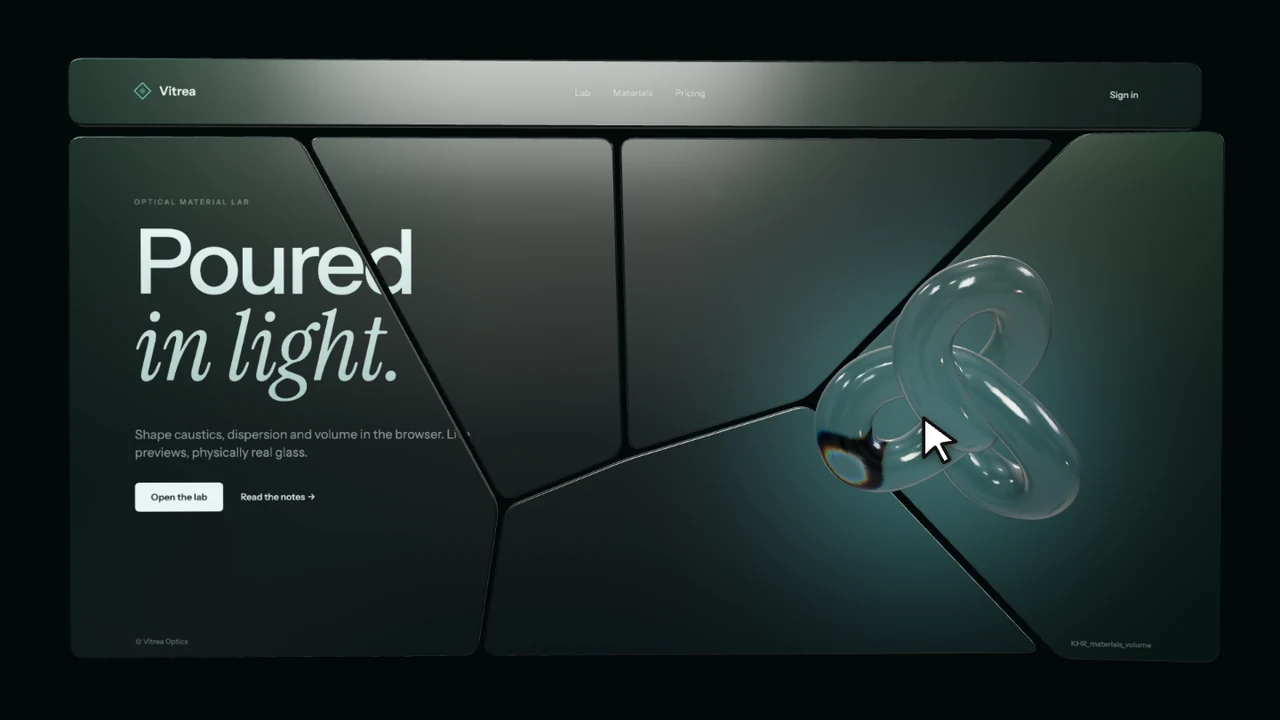
You can see this in practice in NACRE, where a faceted glass block with real dispersion bends a line of type behind it, and VITREA, which shatters a page into glass shards.
Making browser 3D usable, not just pretty
- Keep every word of real content in HTML, not drawn into the canvas, so search engines and screen readers can read it.
- Give drag-to-rotate a visible hint and never trap the page scroll inside the canvas on touch devices.
- Provide a static fallback when WebGL is unavailable: check
renderer.getContext()inside a try/catch and swap in a poster image. - Test on a real mid-range Android phone, not only device emulation. Thermal throttling appears after 30–60 seconds.
Should you use WebGPU yet?
WebGPU unlocks compute shaders and lower driver overhead, and three.js now ships a WebGPU renderer that falls back to WebGL 2. For a marketing website in 2026, WebGL 2 is still the safest default; reach for WebGPU when you need tens of thousands of simulated particles or GPU compute, and keep the fallback path tested.
Build a browser-based 3D website faster
Starting from a working scene is far quicker than prompting one from nothing. The Scrollhaus 3D website templates include live previews you can scroll and drag before choosing, plus a build prompt that tells Lovable, Bolt, Cursor or Claude Code exactly which renderer settings, budgets and fallbacks to use. Free examples such as PLENUM and ORVELLE are open to everyone.
For more ideas, compare 12 3D website examples and the interactive 3D website templates guide.
Frequently asked questions
What is browser-based 3D?
A 3D scene rendered by the visitor’s own graphics card inside a normal web page with WebGL or WebGPU, with no plugin or app install.
How do I make a 3D website load fast?
Show a poster or HTML first, cap the pixel ratio at 1.5–2, compress textures as KTX2, keep draw calls under about 100 and pause rendering when the scene is offscreen.
Is WebGPU ready for websites?
It ships in Chrome, Edge and Safari, and three.js has a WebGPU renderer with a WebGL 2 fallback. For most marketing sites WebGL 2 remains the safest default.
Do 3D websites hurt SEO?
Not if every word of content stays in HTML and the first paint does not wait for the GPU. The canvas should decorate the page, not contain its text.
Explore animated website templates at Scrollhaus →
Need help with a template, account, or project? Email admin@scrollhaus.ai.