Website Motion · 2026-10-17 · 5 min read
Interactive 3D Website Templates: Cursor Effects You Can Paste In
A 3D website used to mean a heavy scene, a long loader and a model that only spun. The interactive 3D templates worth using today are smaller and smarter: they answer the cursor, they load in seconds, and they sit inside an ordinary landing page instead of replacing it.
Written by Amanjot Singh, founder of Scrollhaus, and edited by the Scrollhaus editorial team. Sources and methodology are documented in the article.
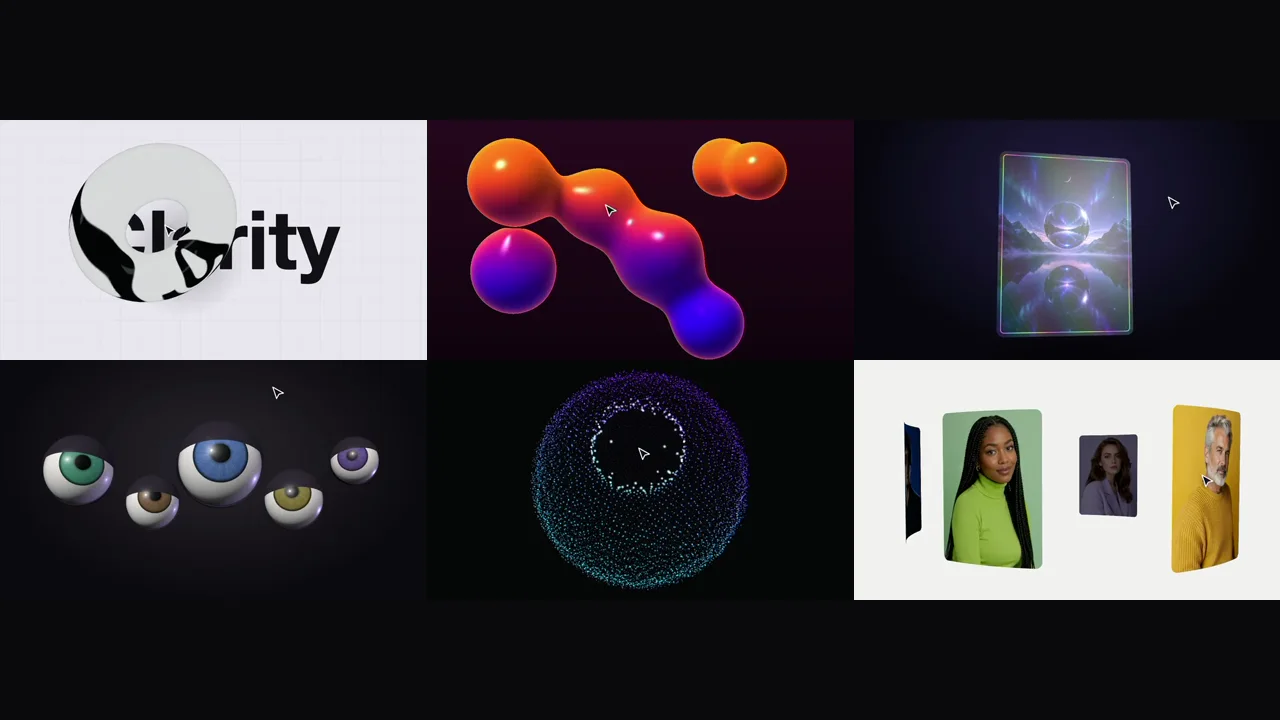
Quick answer: an interactive 3D website template is a ready-made WebGL scene, usually built with three.js, that reacts to the mouse in real time. The best ones are a single snippet you paste into a hero section, they pause when off screen, and they keep your headline and call to action as normal HTML. Scrollhaus has a growing collection of original 3D templates you can try live before copying.
What makes a 3D website feel interactive
Plenty of 3D web design is beautiful but passive: a model turns, a camera glides, and the visitor watches. Interactive 3D gives control back. The cursor becomes an input, so the scene leans, parts, bends or chases it. That small moment of cause and effect is what makes people stay on a hero section a few seconds longer, and it is why cursor-driven 3D shows up across the best 3D websites for design inspiration.
Good interaction is legible. A visitor should understand what their mouse did within a second: the glass lens bends the word under it, the particle sphere opens a hole where the pointer is, the watching eyes simply look at you. If the link between movement and response is fuzzy, the effect reads as noise.
Six kinds of interactive 3D effect
Glass and refraction
Transmissive glass that bends real typography is one of the strongest looks in current 3D web design. Because the text behind the glass is live, the refraction changes as the object moves, which no static render can fake. See the glass cube stack and the shattering crystal.
Particles and shaders
Thousands of points or a full-screen shader can react to the mouse without touching the CPU, because the displacement happens on the GPU. The gravity galaxy turns the cursor into a gravity well, and the lava metaballs make the pointer one more blob in the field.
Physics and soft bodies
Simple physics feels tactile: cloth you can push, balls you can shove, a jelly cube that ripples where you poke it. The cloth banner runs a real verlet simulation; the cursor push balls treat the pointer as a solid object.
Type and images
3D does not have to replace your content; it can stage it. A lens that reveals a photo inside giant letters, a curved portrait carousel or a holographic tilt card keep the message front and centre.
Characters
Eyes that follow the cursor, icons that are drawn to it like magnets, letters that jump when hovered. Characterful effects suit playful brands, 404 pages and onboarding.
Trails and fluids
A cursor trail is the oldest mouse interaction on the web, and 3D makes it new: an iridescent ribbon or an ink smoke trail turns every movement into a brushstroke.
Spline or code: which should you use?
Spline is excellent for designing 3D scenes visually and is many designers' first step into 3D. A code-first template takes a different route: one module script that loads three.js from a CDN, with the colours and words in a settings block. You trade the visual editor for a smaller payload, no viewer runtime, no scene file to host and full control over how the cursor drives the scene. Many teams use both: Spline for modelled objects, code for the interactive moments that are easier to express in a few lines.
Where interactive 3D belongs on a landing page
Use one 3D element per view, in the place that carries the story: usually the hero section, sometimes a product reveal further down. Give it a fixed height so the layout never jumps, and put the headline and the button in HTML beside or over it. Search engines and screen readers read the text; the 3D supports it.
- Hero sections: a reactive object beside a short headline.
- Feature sections: magnetic icons or a shape that morphs as the cursor moves across options.
- Galleries: a carousel or card fan for portfolios and team pages.
- Empty states and 404 pages: a small, friendly character.
Performance best practices for 3D on the web
Interactive 3D only works if the page stays fast. The rules are simple and they matter more than the effect itself:
- Render only while the scene is visible; pause it when it scrolls away.
- Cap the device pixel ratio at 2 (lower for full-screen shaders).
- Do the heavy maths in shaders, not in JavaScript loops.
- Keep one WebGL scene per screen rather than stacking several.
- Ship text as HTML, never baked into the canvas.
Every Scrollhaus 3D template follows these rules, and the scroll performance guide covers how to measure the result.
Cursor effects on touch devices
Phones have no hovering cursor, so an interactive 3D template needs a plan for touch. The approach that works best is an idle mode: when the pointer has not moved for a couple of seconds, the scene drives itself with a slow, looping motion, and taps still trigger the click interaction. Visitors on phones see the scene alive instead of frozen.
How to add an interactive 3D template to your site
- Open a template on the 3D templates page and try it live.
- Copy its snippet: one element and one script.
- Paste it into a Code, Embed or Custom HTML block in Webflow, Framer, WordPress, GoHighLevel or plain HTML.
- Change the colours, words or image URLs in the settings block, then publish and check it on a phone.
For the full page around it, pair a 3D hero with one of the web templates, or read our 3D website examples for layout ideas.
Frequently asked questions
What is an interactive 3D website template?
A ready-made WebGL scene, usually built with three.js, that reacts to the mouse in real time and can be pasted into a page as a single snippet.
Do interactive 3D effects slow down a website?
Not if they are built carefully: render only while visible, cap the pixel ratio, do heavy work in shaders and keep text as HTML. One 3D scene per screen is a good rule.
Do I need Spline to make a 3D website?
No. Spline is a great visual editor, but code-first three.js templates give the same polished look as one small script you can paste anywhere.
Do cursor effects work on phones?
Good templates switch to an automatic idle motion on touch screens and keep tap interactions, so phones still see the scene move.
Explore animated website templates at Scrollhaus →
Need help with a template, account, or project? Email admin@scrollhaus.ai.