Website Animation Guides · 2026-10-14 · 6 min read
Scrollytelling Examples: 8 Websites That Tell a Story as You Scroll
Scrollytelling is a web design technique where the story advances as the user scrolls: scroll position, not a play button, drives the animation, the video and the text.
Written by AmJ, founder of Scrollhaus, and edited by the Scrollhaus editorial team. Sources and methodology are documented in the article.
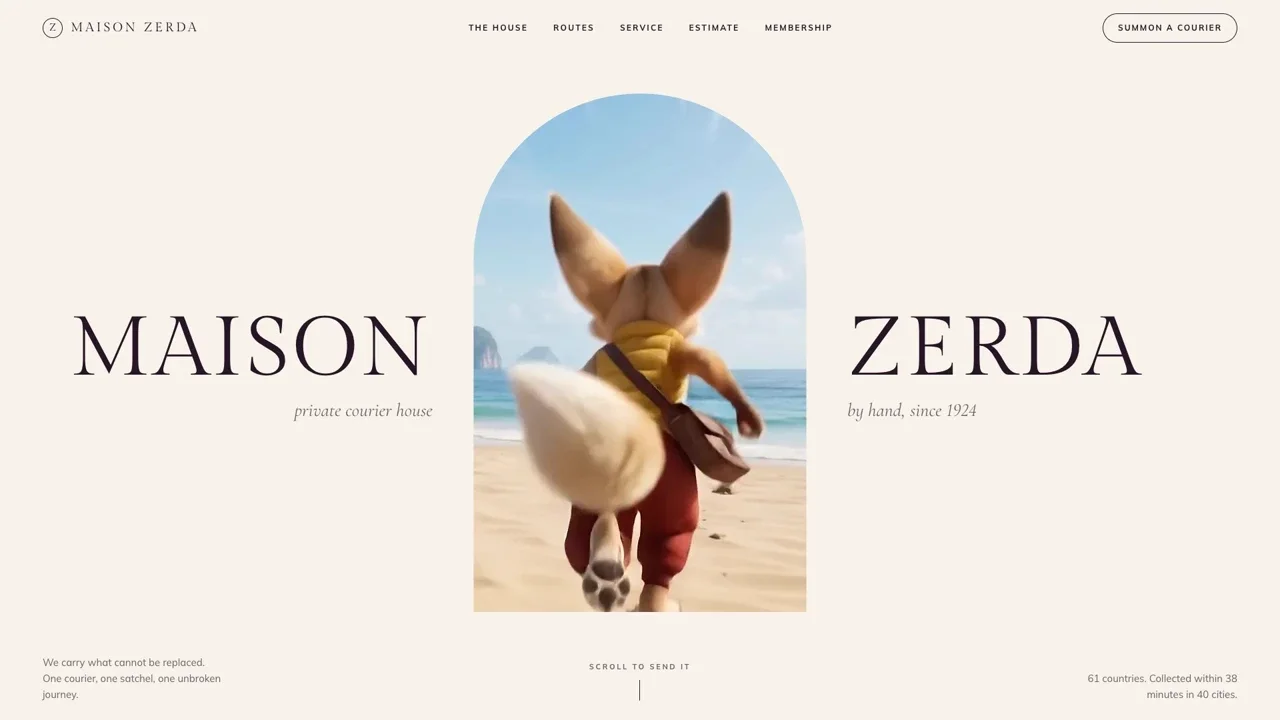
Scrollytelling is a web design technique where a story unfolds as the user scrolls. Scroll position acts as the timeline: it plays the video, moves the camera, reveals content and swaps the text, so the reader controls the pace. The best examples feel like an interactive story rather than a long webpage. Below are eight scrollytelling examples you can open and scroll, the techniques behind them, and how to create a scrollytelling website of your own.
Scrollytelling examples you can scroll right now
Every example in this list is a live page, not a screenshot. Open one, scroll slowly, then scroll back up: a real scrollytelling experience rewinds as cleanly as it plays.
- Maison Zerda: one journey across four worlds. A courier runs through a beach, an arctic night, a mirror lake and a garden road. The film opens out of an arched window, and a paper waybill counts kilometres and temperature as you travel. It shows how a product story can carry a whole business website.
- Grim & Tonic: a film that hands over to 3D. Scrolling uncorks a skull-shaped bottle frame by frame. When the film ends, the same bottle becomes a live 3D object that turns toward your cursor. Two interactive elements, one continuous story.
- Solenne: a walkthrough with a map. The scroll walks you through a villa while a small floor plan tracks which room you are in. This is the step-by-step pattern that property, hotel and showroom websites can reuse.
- Bad Hare Day: a timeline told in minutes. A hare, a motorbike and four timestamps. Each card is a moment in one evening, and the ride itself is a scrubbed film.
- Cumulus: a place revealed in stages. A page for an imaginary pool above the clouds. Four caption cards walk through the scene while an altimeter climbs to 3,120 m as you scroll.
- Vesper Atlas (free): an atlas with chapters. A free single-file template: three planets drawn in canvas, each opened by a portal that expands as you scroll.
- Archer (free): a luxury service told in scenes. A free private-aviation page that is useful for studying pacing: how much scroll each scene gets before the next begins.
- Mesa Alta (free): landscape as the narrator. A free hospitality page for a desert thermal soak. Every scene is drawn in SVG and scrubbed with GSAP ScrollTrigger, so it is light to load.
Outside this library, the piece most often credited with making the form popular is The New York Times feature "Snow Fall" (2012), and news graphics teams still publish some of the best examples each year.
Five scrollytelling techniques behind these websites
Almost every scrollytelling website is built from the same small set of design techniques. Knowing their names makes it much easier to brief a designer, a developer or an AI tool.
- Pinned sections. The section stays fixed on screen while the user scrolls, and its content changes in place. This is what makes a page feel like a scene instead of a document.
- Scrubbed video or image sequence. A film is split into frames and the current frame is chosen by scroll position, so the animation plays forwards and backwards with the wheel. See the image sequence tutorial for the code.
- Step triggers. When a paragraph reaches the middle of the screen, something updates: a chart, a map, a caption or a colour theme. This is the classic pattern for data stories and infographics.
- Parallax. Layers move at different speeds to add depth. Parallax scrolling is one ingredient of scrollytelling, not a synonym for it. There are more in the parallax examples guide.
- Horizontal scrolling. A pinned rail moves sideways while the user scrolls down, which suits a timeline, a product range or a set of routes.
When to use scrollytelling, and when not to
Use scrollytelling when the order of the content matters: a product story, a launch, a process, a case study, a place, a piece of reporting. It helps because it keeps visitors engaged with one idea at a time and gives them an immersive experience without asking them to press play.
Skip it when visitors arrive to do a task. A pricing page, a booking form or documentation should be fast to scan. A good rule is one scrollytelling section per landing page, followed by plain, digestible sections that answer practical questions.
Scrollytelling best practices
- Keep the text as real text. Headings and key points belong in HTML, not baked into video. Search engines, AI assistants and screen readers can only read what is in the page.
- Give each scene enough scroll. As a guide, aim for about three viewport heights for a ten-second film. Too little and it flashes past; too much and it feels stuck.
- Design the phone version on purpose. Responsive design is not optional here. Check the story across all devices, and confirm nothing scrolls sideways by accident.
- Respect reduced motion. When a visitor has asked their device for less motion, show the final state of each scene instead of animating it.
- Watch the weight. Load a coarse set of frames first and fill in the rest, so the story is scrubbable almost at once. The scroll performance guide covers the details.
How to create a scrollytelling website
There are three practical routes, and they suit different people.
- No-code builders. Vev, Webflow and Framer have visual scroll timelines. They are the quickest route for web designers who do not want to touch code, with a monthly platform fee.
- Code it by hand. GSAP ScrollTrigger and Lenis are the common pair, and CSS scroll-driven animations now cover simple cases natively in current Chrome, Edge and Safari (check support before relying on it). Start with the ScrollTrigger examples.
- Start from a working example and adapt it with AI. Describing motion in words is where AI tools struggle most. Giving the tool a finished page with source code works far better: it only has to change your content, not invent the timing. Every template in the Scrollhaus collection has a live preview and its source, and several are free.
Summary
Scrollytelling turns scrolling into a way to tell a story: pinned scenes, scrubbed film, step triggers, parallax and horizontal rails, with real text on top. Study a few live examples, pick one technique that fits your story, and keep everything after it simple.
Frequently asked questions
What is scrollytelling?
Scrollytelling is a form of storytelling on the web where content is revealed, animated or changed as the reader scrolls. The scroll bar works like a timeline: scroll down to move the story forward, scroll up to rewind it.
What is the difference between scrollytelling and parallax scrolling?
Parallax scrolling is one visual effect: layers move at different speeds to create depth. Scrollytelling is the whole narrative approach, and it may use parallax, pinned sections, scrubbed video, step-triggered charts and horizontal scrolling together.
Which tools are used to build a scrollytelling website?
Most scrollytelling websites use GSAP ScrollTrigger or native CSS scroll-driven animations for the scroll timeline, Lenis for smooth scrolling, and a canvas image sequence or video for scrubbed film. No-code tools such as Vev, Webflow and Framer offer visual editors for the same techniques.
Is scrollytelling bad for SEO or accessibility?
Not when it is built with real HTML text. Keep headings and copy in the page rather than inside images or video, respect the reduced-motion setting, and make sure the page still reads in order without animation.
Can I build a scrollytelling website with AI?
Yes. AI coding tools such as Claude Code, Cursor, Lovable and Bolt can build one, and they are far more reliable when you start from a working example with source code than from a text description of the motion.
Explore animated website templates at Scrollhaus →
Need help with a template, account, or project? Email admin@scrollhaus.ai.