AI Website Guides · Published · 7 min read
Three.js Website Templates: Free and Paid Sources, Examples and What to Check
Where to find Three.js website templates, six live 3D examples, and the loading, mobile and fallback checks that decide whether a 3D site ships.
Published by Amanjot Singh, founder of Scrollhaus. AI-assisted editorial work; product context, sources and corrections are documented in our editorial methodology.
Quick answer: a Three.js website template is a ready-made site that already has a WebGL scene wired into the page: a 3D model in the hero, a particle field, or a camera that moves as you scroll. Good ones also solve loading, mobile performance and fallbacks, which is where most 3D projects fail. This guide covers the types of Three.js templates, where to get free and paid ones, what to check before you choose, and how to adapt one with an AI coding tool.
What is a Three.js website template?
Three.js is an open-source JavaScript library that draws 3D graphics in the browser using WebGL. A Three.js website template combines that 3D layer with a normal website: navigation, text, sections, forms and a footer. The template decides how the two layers talk to each other. For example, the scroll position can drive the camera, or the cursor can tilt a model.
That link between page and scene is the hard part. The official three.js examples show hundreds of techniques, but each is a single demo on an empty page. A template turns a technique into a site you can ship.
Types of Three.js website templates
| Type | What happens on the page | Good for |
|---|---|---|
| 3D product hero | A GLB model sits behind or beside the headline, rotates slowly and reacts to the pointer | Product launches, hardware, jewellery, eyewear |
| Scroll-driven camera | Scrolling moves the camera through a scene or between fixed views | Architecture, real estate, storytelling |
| Particle scenes | Thousands of points form a shape, then morph into another | AI, science and technology brands |
| Exploded view | A model splits into labelled parts as you scroll | Engineering, medical and product education |
| Configurator | The visitor changes colours or materials and turns the model | Furniture, vehicles, fashion |
| 3D portfolio | Projects live in a small world or gallery you navigate | Developers and studios |
| Shader background | A full-screen animated shader sits behind normal content | SaaS and landing pages that need atmosphere |
Where to find Three.js website templates
Free sources
- The three.js repository and examples: the best place to learn a single technique. Not full sites.
- GitHub portfolio starters: many developers publish React Three Fiber portfolio templates. Quality and maintenance vary, so check the last commit date.
- CodePen and CodeSandbox: small experiments you can read and fork.
- Scrollhaus free websites: complete sites with source and build instructions. Morphos is a free WebGL site where particle point clouds morph through four forms across a long scroll.
Paid sources
- ThemeForest and Envato Elements: a small number of HTML and React templates that use Three.js, mostly agency and portfolio layouts.
- Webflow and Framer marketplaces: templates that embed a 3D scene, often through Spline instead of hand-written Three.js.
- Scrollhaus: a library of complete animated websites, many built on three.js 0.169 with GLB models, each with a live preview, source and a written build spec.
Inspiration galleries
Awwwards, Dribbble and showcase sites collect the best Three.js websites. They are useful for ideas, but they do not give you code. Our list of 3D website examples explains what each technique involves.
Six Three.js website examples you can build from
These are live sites in the Scrollhaus library. Open each one and scroll it before you read any code.
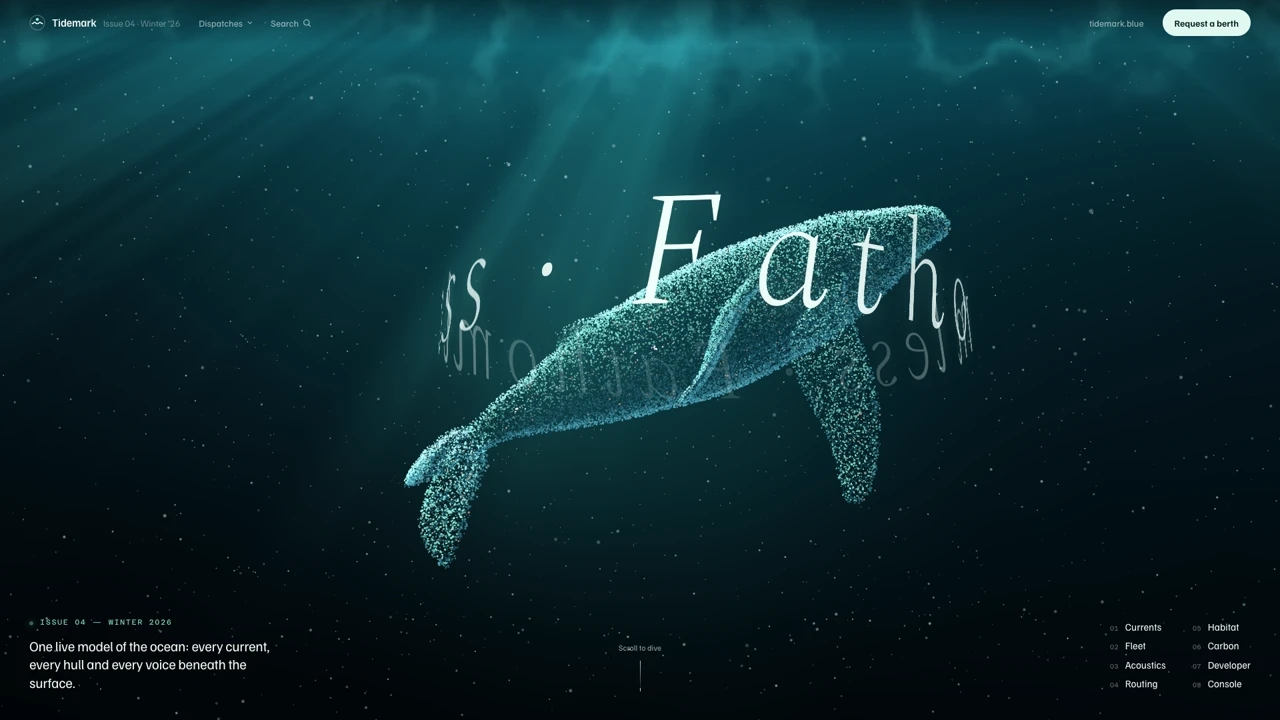
- TIDEMARK: a humpback whale made of 36,000 particles dives into a live contour chart and a glowing deep-sea scene.
- LANTERNA: a pagoda on dusk water with five camera views, bloom lighting and a floor plan that draws itself.
- OAKVALE: a real estate platform with a cutaway 3D house that turns to face the room you choose.
- ÉMAIL: a dental brand where a 3D implant assembles itself, then explodes into labelled parts on scroll.
- KYUSU: tea vessels shown as a particle cloud that morphs between shapes.
- Morphos: free to build, with additive-blended particle anatomy on a near-black canvas.
Three.js starter kits, tutorials and frameworks
If you want to create a site from a blank project, a starter kit is quicker than a full template. A common path is Vite plus the three package from npm: one HTML file, one JavaScript file, a renderer, a camera and a scene. Bruno Simon's simple threejs template on GitHub follows this pattern and is a good first tutorial. For other frameworks, React Three Fiber covers React, TresJS covers Vue and Threlte covers Svelte.
For creative development ideas, Codrops publishes technical write-ups on shaders, page transitions, grid effects, fluid simulation and playable 3D worlds built with Three.js. Recent articles explore WebGPU and the TSL shading language, which the latest three.js releases support alongside WebGL, and which use the GPU more efficiently. Many creative tech studios pair Three.js with GSAP for scroll animation and dynamic timelines. Sites using Three.js this way reward exploration, inspire custom work and help you discover techniques. They are useful background before you hire a specialist or adapt a threejs website template yourself.
What to check before choosing a template
- File size of models. A hero model should be well under 2 MB. Look for GLB files compressed with Meshopt or Draco and textures in WebP or KTX2.
- Loading behaviour. Is there a loader tied to real download progress? Does the page work before the model arrives?
- Mobile performance. Test on a mid-range phone. Good templates cap pixel ratio, reduce particle counts and pause rendering when the canvas is off screen.
- One render loop. A single requestAnimationFrame loop should drive the scene and scroll effects. Several loops cause jank.
- Fallbacks. There should be a static image for browsers without WebGL and a calmer mode for prefers-reduced-motion.
- Framework fit. Plain Three.js, React Three Fiber and Next.js projects are not interchangeable. Pick the one your team uses.
- Licence. Confirm commercial use, client work and whether the 3D models themselves are included.
- SEO. Text must be real HTML over the canvas, not drawn inside WebGL, so search engines and screen readers can read it.
Plain Three.js or React Three Fiber?
| Plain Three.js | React Three Fiber | |
|---|---|---|
| Best when | One scene on a mostly static page | The 3D reacts to a lot of app state |
| Learning curve | You manage the scene, loop and cleanup yourself | Declarative, with helpers from Drei |
| Bundle | Smaller | Larger, but tree-shakeable |
| AI coding tools | Easy for an agent to follow in one hook or file | Works well inside an existing React codebase |
For a marketing site with one hero scene, plain Three.js inside a single cleaned-up hook is usually simpler and faster.
How to adapt a Three.js template with AI
AI coding tools are good at changing a working scene and poor at inventing one from a sentence. So start from something that works.
- Pick a template with the right mechanic, such as a scroll-driven camera, then ignore its brand.
- Give the agent the build spec or source. In Claude Code, Cursor or Codex, put the spec in the repository and ask for the site section by section.
- Swap the model. Replace the GLB with your own. If you have no 3D artist, text-to-3D tools can produce a usable model that you compress before use.
- Retune lighting and materials to your brand colours. Small changes to the key light and environment make a big difference.
- Test on a phone and measure. Check frame rate and Core Web Vitals, then reduce geometry or effects if needed.
See how to make an animated website with Claude Code and interactive 3D website templates for worked examples.
Performance rules for Three.js websites
- Cap
devicePixelRatioat 2, and lower on weak devices. - Compress geometry with Meshopt, and resize textures to the size they appear.
- Load the model after the first paint unless it is the hero.
- Stop the render loop when the canvas leaves the viewport or the tab is hidden.
- Prefer baked lighting and an environment map over many real-time lights.
- Dispose of geometries, materials and textures when a scene unmounts.
Our guide to Core Web Vitals for animated websites covers measurement in more depth.
Choosing the right starting point
If you are learning, start with the official examples and one free template. If you have a client deadline, start with a complete site whose 3D, loading and mobile behaviour are already solved, then change the brand. Scrollhaus has 276 websites with live previews, and 26 are free after a free sign-in. Browse the 3D website designs or compare access plans.
Frequently asked questions
Are there free Three.js website templates?
Yes. The three.js examples, GitHub starter kits, CodePen demos and the free websites in the Scrollhaus library, such as Morphos, are free to study and build from.
Should I use Three.js or React Three Fiber for a website?
For one hero scene on a marketing page, plain Three.js in a single hook is simpler and lighter. Choose React Three Fiber when the 3D reacts to a lot of React state.
Do Three.js websites hurt SEO?
Not if the text is real HTML above the canvas, models load after first paint, and the page has a static fallback. Text drawn inside WebGL cannot be read by search engines.
Can AI build a Three.js website?
AI coding tools adapt a working scene well but rarely invent a good one from a sentence. Start from a template or build spec, then ask the agent to swap the model and brand.
Browse Scrollhaus website designs and build resources →
Need help with a template, account, or project? Email admin@scrollhaus.ai.