AI Website Guides · 2026-10-02 · 12 min read
BrowserMoon Alternative: What to Choose Instead
Compare BrowserMoon alternatives for templates, components, AI coding, Figma, Webflow, and production-ready website workflows.
Written and reviewed by Scrollhaus Editorial. Sources and methodology are documented in the article.

Key takeaways
Disclosure: ScrollHaus publishes this guide. ScrollHaus is a library of animated website templates with live previews and editable source, so it is one of the options in this space. Information about other products is based on their public websites and can change, so check the current details before you decide.
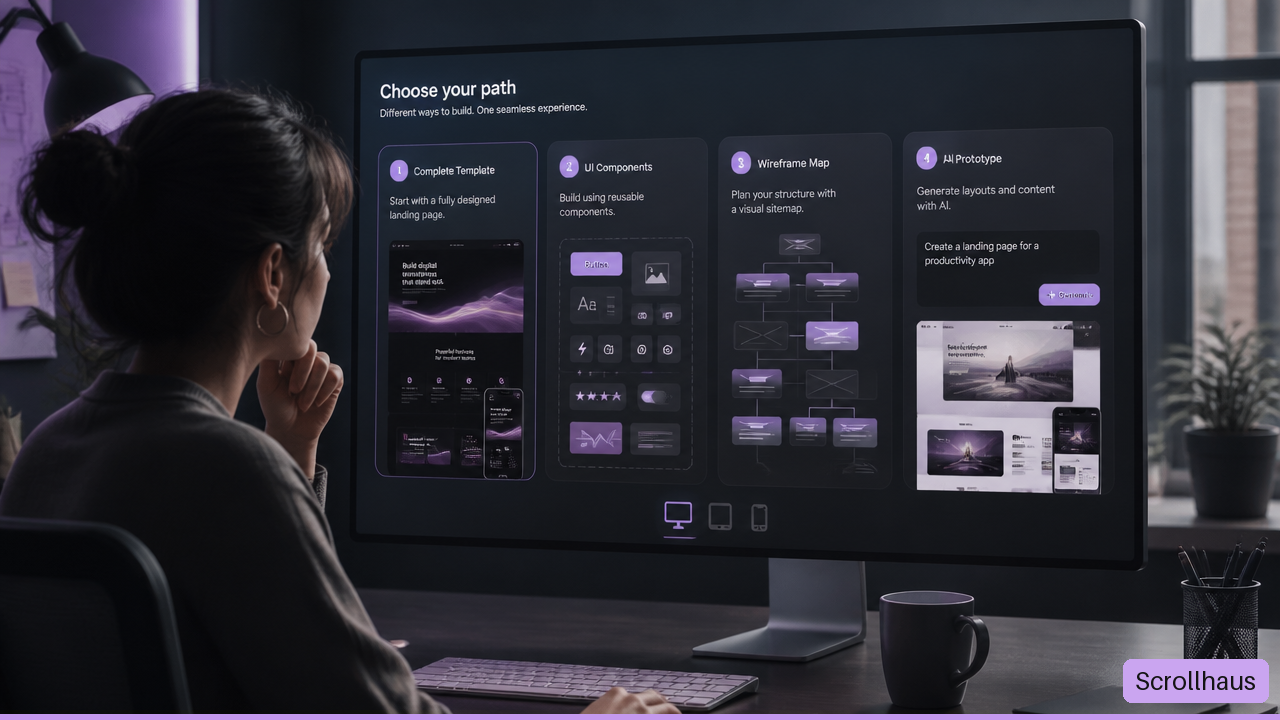
A BrowserMoon alternative is not automatically a better replacement. The right option depends on what you need to produce: a complete landing page, reusable React components, a wireframe, or an AI-generated prototype. I recommend choosing based on the handoff you need next, not the size of a template catalog.
What BrowserMoon Is Designed To Solve
BrowserMoon positions itself as a library of complete website, landing page, and app designs for AI-assisted coding workflows. Its core idea is simple: start with a visual direction that already has a page structure, then adapt it in tools such as Lovable, Bolt, Replit, Cursor, or Claude Code.
That makes it different from a typical UI library. A button library gives you parts. A complete-page library gives you a composition: hero area, navigation, type scale, card treatment, spacing rhythm, section order, and call to action. For a founder trying to launch a product site, that broader starting point can remove a lot of blank-page friction.
Still, a full-page template is only one kind of starting point. It may not be the best fit if your team already has a design system, needs deeply reusable application components, or works primarily in Figma and Webflow.
Complete Pages Versus Building Blocks
The most useful distinction is not “template versus tool.” It is page composition versus interface primitives.
| Starting Point | What You Receive | Best For | Watch Out For |
|---|---|---|---|
| Complete-page template | A cohesive page or screen design | Marketing sites, launch pages, portfolios, early SaaS sites | May need extensive refactoring for a mature product system |
| Component library | Buttons, forms, dialogs, tables, menus, and patterns | React apps, dashboards, internal tools | You must create the page hierarchy yourself |
| Wireframe system | Site maps, page plans, low-detail layouts | Content planning, stakeholder alignment, Webflow and Figma teams | Usually not ready to ship as code |
| AI generation tool | Prompt-created UI and code concepts | Rapid exploration and one-off concepts | Output quality can vary from prompt to prompt |
Consider a SaaS company building a pricing page. A complete template can give it a fast visual baseline: plan cards, comparison rows, testimonials, and a final conversion section. But if the same company needs an authenticated product dashboard with role-based controls and complex forms, a component-first approach is usually safer. The dashboard will change more often, and consistent primitives matter more than one polished screen.
What “Works With AI Coding Tools” Actually Means
A template can be useful in an AI coding workflow without being a one-click production deployment. Those are separate claims.
When a person pastes a template or design reference into an AI coding tool, the model typically interprets the visible structure and instructions, then produces its own implementation. It may rebuild the layout with React, HTML, CSS, Tailwind CSS, or another stack. The result can look close to the reference while using different markup, spacing values, assets, and interaction logic.
That process creates four common gaps:
• Visual drift: Text wrapping, font choices, gradients, and spacing shift away from the reference.
• Dependency drift: The generated project uses packages, icon sets, or animation tools that were not part of the original setup.
• Behavior gaps: A menu, carousel, form, or modal looks finished but does not work correctly.
• Accessibility gaps: The visual result may omit focus states, labels, keyboard support, or semantic landmarks.
This does not make AI-assisted building unreliable. It means the template is a direction, not a guarantee. The more your website depends on exact functionality, the more carefully you should verify the transferred result.
The Best BrowserMoon Alternatives By Workflow
There is no single best BrowserMoon alternative for everyone. A component registry, a design system, a wireframe platform, and an AI interface generator solve different problems. Choosing one by appearance alone often creates more work later.
Choose shadcn/ui Or Tailwind UI For Systematic Interfaces
shadcn/ui is a strong fit for teams building React interfaces that need ownership and control over their components. Rather than treating a component as a sealed package, its model centers on bringing editable code into your project. That can work well when forms, dialogs, tables, and navigation patterns need to match an existing product system.
Choose shadcn/ui when:
• You are building primarily with React and Tailwind CSS.
• Your project needs consistent interface patterns across many screens.
• You expect developers to modify components directly.
• Accessibility and state handling matter more than a ready-made marketing composition.
Avoid relying on it alone when your main challenge is art direction. It can provide a capable dialog or data table, but it does not decide whether your homepage should feel editorial, playful, technical, or premium.
Tailwind UI is often better suited to teams that want polished interface patterns and templates within the Tailwind ecosystem. It can speed up standard marketing and application structures, especially where familiar patterns are an advantage. The trade-off is differentiation. If several sites begin from the same recognizable structure and receive only minor edits, they can feel interchangeable.
Choose 21st.dev Or Aceternity UI For Distinct Components
21st.dev is closer to a component registry than a full-page design library. BrowserMoon describes it as a community registry for React and Tailwind components, with an MCP-based integration approach for compatible editors. That makes it relevant when you need a specific piece of interface rather than a complete visual system.
For example, imagine you already have a working SaaS homepage but need a stronger pricing selector, command menu, animated hero element, or dashboard chart shell. A component registry may get you there faster than replacing the full page.
Aceternity UI is another useful option when motion-rich React components are the priority. It can make sense for a project that needs one expressive interaction, such as a layered card effect or animated navigation treatment, without committing to an entire template’s design language.
Fair warning: visually impressive components can create a maintenance burden. A complex animation may add layout shift, mobile issues, weak keyboard behavior, or poor performance if it is added without testing. Use motion to clarify hierarchy or feedback, not just to fill empty space.
Choose Relume Or Google Stitch For Earlier Design Decisions
Relume is better suited to a workflow that begins before code. BrowserMoon characterizes Relume around sitemaps, wireframes, Figma, and Webflow. That is valuable when the unanswered question is not “Which hero design should we build?” but “Which pages do we need, and how should they connect?”
Choose Relume when:
• You need a site map before visual design.
• Multiple stakeholders need to agree on page scope and content structure.
• Your delivery workflow centers on Figma or Webflow.
• A marketing site has many pages, audience paths, or content types.
Google Stitch fits a different stage: exploratory prototyping from a text description, screenshot, or sketch. It can be useful when you want several rough interface directions quickly. But generated prototypes need a second pass for production work. A prototype may suggest a compelling layout while leaving unanswered questions about responsive states, semantic HTML, data loading, and error handling.
A polished screenshot is evidence of visual possibility. It is not evidence that the page is ready to ship.
How To Test Templates Before You Commit
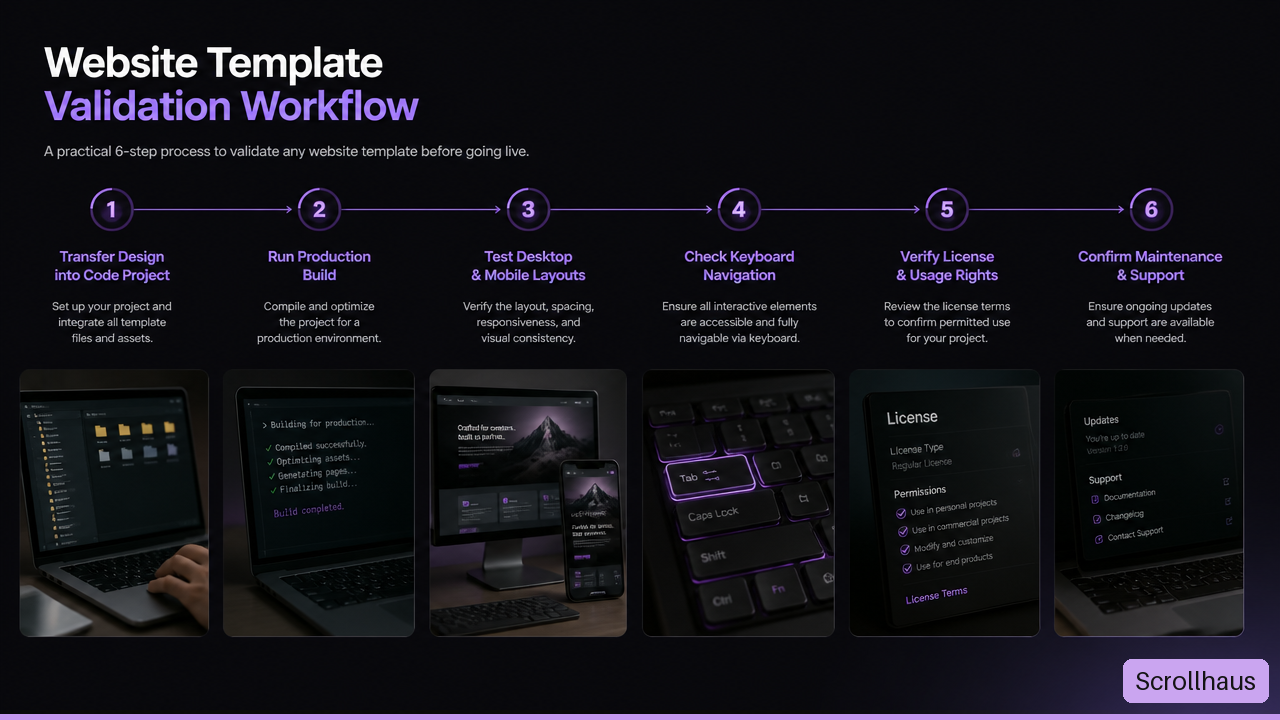
The best template is the one that survives your actual workflow. Before paying for a license or rebuilding a design across multiple pages, run a small transfer test. I would treat this as a practical acceptance test, not a beauty contest.
Run A Small Transfer Test First
Pick one representative page section: a hero with a navigation bar, a card grid, a form, and a footer is usually enough. Then move it into the exact environment you plan to use.
Create a clean project. Use your real framework, build command, package manager, and deployment target.
Transfer one design direction. Add the template code, reference, or prompt context without mixing in unrelated components.
Build immediately. A successful preview is not enough. Confirm that the production build completes without missing packages or asset errors.
Test common screen widths. Check a narrow mobile width, a tablet width, a standard laptop width, and a wide desktop width.
Test the interactive elements. Open navigation menus, submit forms, use dialogs, and try keyboard navigation.
Record the edits required. Note whether the work involved minor copy changes or major structural rewrites.
This test reveals a key distinction: framework independent does not always mean framework native. A visual template may be possible to recreate in React, Vue, Svelte, and plain HTML, but each version may require different component logic, styling conventions, and asset handling.
For example, an animated React component may depend on a particular animation library and client-side state. Rebuilding the same effect in plain HTML could require a separate JavaScript solution. The appearance can transfer; the implementation effort may not.
Check Accessibility, Ownership, And Maintenance
A template purchase or copied component does not remove product responsibilities. Before release, verify the basics that visual previews usually cannot show.
| Review Area | What To Check | Why It Matters |
|---|---|---|
| Accessibility | Heading order, labels, focus visibility, keyboard access, color contrast | A page should remain usable without a mouse or perfect vision |
| Responsive behavior | Text wrapping, touch targets, overflow, image cropping | The desktop reference may break on smaller screens |
| Performance | Image weight, font loading, animation cost, unused code | A stylish page can still feel slow on a mobile connection |
| Licensing | Commercial use, modification rights, redistribution, seat or team rules | A one-time price does not explain every usage right |
| Ownership | Where code, assets, domains, and credentials live | Teams need control if a vendor or workflow changes |
| Maintenance | Framework updates, dependency updates, content editing path | A launch is the start of upkeep, not the end |
Licensing deserves special care. BrowserMoon has stated that its Moon Licence is a one-time payment for full template code, but publicly available comparison material does not establish every commercial, redistribution, and team-use condition. The same caution applies to alternatives. Read the current license text before using code in a client project, a product sold to customers, or a template you plan to redistribute.
A useful question is: What would happen if this design became the basis for ten pages and three years of updates? If the answer involves copying blocks of fragile code by hand, the initial time savings may disappear.
Key Takeaways
Match The Tool To The Next Decision
• Choose a complete-page template library when you need a cohesive visual starting point for a landing page, portfolio, or early marketing site.
• Choose shadcn/ui or a similar component-first approach when your React application needs reusable, editable interface primitives.
• Choose 21st.dev or Aceternity UI when a specific component or expressive interaction is the missing piece.
• Choose Relume when information architecture, wireframes, Figma, or Webflow are central to the project.
• Choose an AI generation tool when you need to explore directions quickly, then plan time for refinement.
Treat The Preview As A Starting Point
A BrowserMoon alternative should be judged by more than style. Check whether it builds, responds well on small screens, supports keyboard use, fits your stack, and has license terms that match your intended use. The fastest-looking option can become the slowest if it creates hidden rewrites.
Frequently Asked Questions
What Is The Best BrowserMoon Alternative?
The best BrowserMoon alternative depends on the job. For reusable React interface components, shadcn/ui is often the stronger fit. For an early Figma or Webflow workflow, Relume may be more useful. For individual community-built React and Tailwind components, 21st.dev is worth considering. If you need an entire page direction, prioritize products that offer full-page templates rather than isolated components.
Is There A Free BrowserMoon Alternative?
Some alternatives offer free components, limited collections, previews, or trial access. Free access does not always include commercial rights, source code, premium patterns, or support. Review the active license and feature limits before making it part of a production workflow.
Which Alternative Offers Complete Landing-Page Designs?
Tailwind UI and full-page template libraries are generally closer to this need than component registries. Relume can also help plan complete site structures, though its value is usually strongest in planning and design workflow rather than paste-ready code. Check whether a product provides full source code or only visual references before deciding.
Is shadcn/ui Better Than BrowserMoon For React Projects?
It can be, if your priority is a maintainable component system. shadcn/ui is better aligned with building application interfaces from reusable primitives. BrowserMoon-style complete-page designs may be more useful when a React project needs a quick marketing-site direction. They are complementary approaches, not direct equals.
How Does 21st.dev Compare With BrowserMoon?
21st.dev is more component-focused, while BrowserMoon presents itself as a complete design-template library. Choose 21st.dev when you need a particular interface element in an editor-centered workflow. Choose a full-page option when typography, layout rhythm, and section composition need to arrive together.
Should A Figma Or Webflow User Choose Relume Instead?
Often, yes. Relume is likely the better starting point when the team needs a site map, wireframes, content structure, and design work that moves through Figma or Webflow. It is less appropriate when the immediate goal is to paste a complete page direction into an AI coding tool and begin implementation.
Can A BrowserMoon Alternative Work With Lovable, Bolt, Or Replit?
Many code-based templates and visual references can be used in these environments, but compatibility should be tested rather than assumed. Start with one page section, confirm the project builds, and check responsive and interactive behavior. A tool can generate a close visual match while still requiring manual fixes for assets, packages, and accessibility.
Are BrowserMoon Alternatives Production-Ready?
Some may provide production-capable code, but no template or AI-generated result should be considered production-ready without review. Test the build, check keyboard behavior, validate forms, inspect mobile layouts, review license permissions, and confirm that the code fits your project’s maintenance plan.
Where ScrollHaus fits
If the thing you are comparing is a library that lets you preview real scroll-driven motion before you build, ScrollHaus is built for that: every site has a live preview and the source you can copy into Lovable, Bolt, Claude or Codex.
- Browse the ScrollHaus library of animated website templates
- Try the free templates on GitHub
- See ScrollHaus plans, including quarterly access
- Best AI website template libraries compared
- MotionSites.ai alternative: animated website templates with editable source
Explore animated website templates at Scrollhaus →
Need help with a template, account, or project? Email admin@scrollhaus.ai.