Website Design · 2026-10-06 · 6 min read
Cinematic Website Templates: Choose the Story, Check the Source
A cinematic website needs more than a dramatic hero. Use these working examples and buying checks to choose a story that stays clear, editable and usable through the whole page.
Written by AmJ, founder of Scrollhaus, and edited by the Scrollhaus editorial team. Sources and methodology are documented in the article.
Key takeaways
Cinematic website templates use composition, pacing and movement to tell a story across a page. The useful test is whether that story makes a product or service easier to understand. Start with a working preview, examine how it responds to scrolling, and check the export before choosing a template.
Publisher disclosure: Scrollhaus publishes this guide. The examples are fictional demonstration websites from our own catalogue, not client case studies or evidence of increased sales. We describe the workflow and the buying checks, not a guaranteed business outcome.
Choose a cinematic template by what the scene explains
A striking first frame is only the beginning. A good reference continues into clear information, a usable action and a layout that works on a phone. Look for a sequence that reveals shape, explains a transformation or shows a material; then decide what information the visitor needs next.
| Working example | Story to inspect | Possible adaptation |
|---|---|---|
| CYMA One | A speaker and paint moving with a bass hit | A launch where the product’s distinctive feature drives the visual idea |
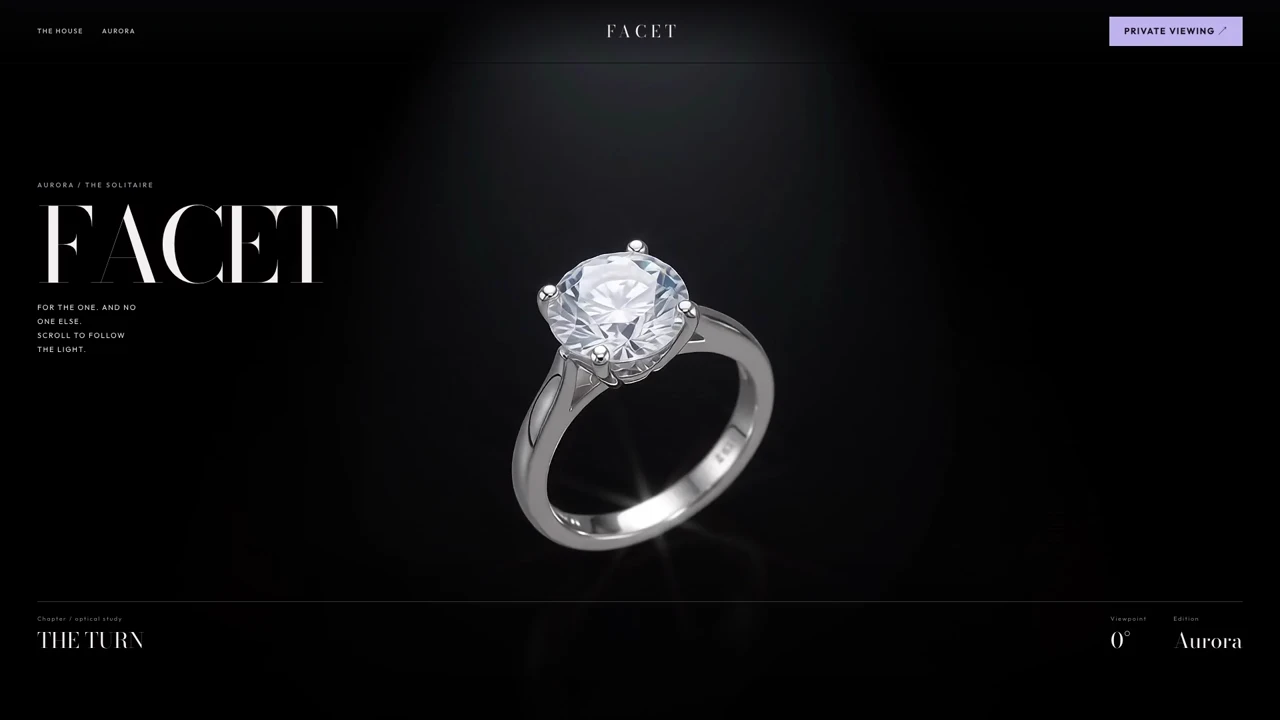
| FACET | A ring and light passing through a diamond | A craftsmanship story that transitions into materials and options |
| HESPER | A launch sequence and mission-style readouts | A complex service explained as an ordered journey |
| UNDO | A detailing transformation and service packages | A service business that needs to make its process understandable |
These are creative starting points. Their simulated products, telemetry, prices and booking actions must be replaced with approved business information and real integrations. Inspect the current source format on each entry; the library includes both portable pages and larger projects.
Video background, image sequence or real 3D?
A looping video changes with time. A scroll-driven image sequence changes with the visitor’s position. A real 3D scene renders geometry in the browser and can support free rotation or interaction. All can look cinematic, but they solve different problems.
Choose a video background for ambience that does not need to follow scrolling. Choose a canvas sequence when the scene must move forwards and backwards at exact points in the story. Choose a real 3D model when visitors need to examine a product from viewpoints that were not filmed. A rendered film does not become an interactive model just because its subject looks three-dimensional.
For the canvas approach, read our image-sequence implementation guide. For a broader comparison, see GSAP and Framer Motion. The library’s source gives you an implementation to examine rather than a reason to guess the technique from the thumbnail.
A full-page story, not an isolated hero
Map the page to a sequence of customer questions. The first scene introduces the product. The next makes a feature tangible. The following section provides evidence or specifications. The final part explains the offer and presents a clear action. The cinematic section should release into ordinary readable content when its job is done.
Animate headings and supporting information in coordination with the scene. Bring copy in from the left or right only when the subject leaves enough room. Use a quiet transition for specifications and pricing rather than making every word compete for attention. Important business information should remain readable even when animation is disabled.
Keep the subject and the words apart
Build a frame-by-frame copy map: note where the product, face or important detail sits, and assign text to the unused space. If the source film already includes words, do not place another heading over them. Choose another shot, remove your overlay during that beat, or obtain a clean source.
Check a wide screen, a phone and intermediate widths. Full-viewport media can crop differently at each ratio. Do not assume that a desktop text position is safe on mobile. A short headline and a deliberate contrast treatment often work better than placing dense copy over a moving object.
What to inspect before buying a template
- Preview: scroll slowly, scroll quickly, reverse direction and return to the first frame. Confirm the scene follows the page rather than requiring the pointer to sit inside a small box.
- Export: determine whether you receive a prompt, standalone HTML or a multi-file project. Original code and asset paths give a builder more concrete information than a screenshot.
- Dependencies: identify fonts, libraries, media and external services. A design demo does not establish that payments, forms or inventory work.
- Licence: distinguish source rights from media rights and confirm commercial or client use.
- Mobile: check legibility, the primary action, reduced motion and the loading experience on a fresh visit.
Our source-export checklist explains the different handoffs. Our licensing guide explains which questions to ask about source, media and client delivery.
Adapt the template without losing the motion
First reproduce the supplied implementation. Then change the brand, text, colours and media in separate passes. Ask your AI builder to preserve the scroll calculations, frame indexing and layout while replacing content. Verify each change before adding another interaction.
Use the supplied source as the implementation reference.
Preserve its scroll-to-frame mapping and chapter boundaries.
Replace demo branding with my approved brand and copy.
Place text in clear areas of each scene; never cover the subject.
Keep important product information and the action in HTML.
Connect forms and checkout to my existing services.
Check forward scroll, reverse scroll, first frame and final hold.
Test at 1440x900 and 390x844, plus reduced motion.
Report any missing dependencies or media rights before launch.
Do not request a dozen visual changes in the first generation and then judge whether the original works. Keep a known-good copy so you can distinguish a template issue from a change introduced during customization.
Budget for the whole launch
A library fee buys the included resources and access period. Your AI-builder subscription, domain, production hosting, approved media and any custom integration work are separate. A modest template price is not a quote for a complete custom website.
Scrollhaus’s paid plans unlock the same premium collections: $49.99 every two months, $199 yearly, or $299 as a one-time lifetime payment under the Terms. The distinction is access duration, not a hidden feature tier. Compare what each plan includes, and try the free collection before buying.
Measure usefulness after launch
Use motion to support understanding and a usable buying path. Track meaningful actions such as enquiries, completed orders or product-option choices. A long viewing time can mean engagement, confusion or a blocked action; interpret it alongside the result you wanted visitors to achieve.
Measure real loading and interaction performance. Fetch media with a deliberate priority order rather than starting every chapter at once. Keep a sharp first view, reserve layout dimensions, pause offscreen loops and provide a clear way to skip a long sequence. See Core Web Vitals for animated websites for the verification checklist.
For product-specific inspiration, explore four animated fashion website examples and five luxury product website examples. Both guides link to working previews and explain what to verify before using a concept for a real store.
Sources and further reading
Frequently asked questions
Do cinematic website templates need Three.js?
No. A cinematic page can use a looping video, a scroll-driven canvas image sequence or real browser-rendered 3D. Choose the technique around the interaction you need, and inspect the source before deciding.
What does Scrollhaus paid access include?
All paid plans unlock the same premium website and creative collections. Portable entries include original source and build instructions; larger projects have their own handoff. The billing period differs, and AI credits, domain and hosting are separate.
How can I avoid text overlapping a cinematic scene?
Map the subject’s position through the sequence and assign copy to the unused space. Hide overlays during scenes with embedded text, and check the composition at desktop and phone widths before publishing.
Explore animated website templates at Scrollhaus →
Need help with a template, account, or project? Email admin@scrollhaus.ai.