Fashion Website Guides · 2026-10-06 · 5 min read
Animated Fashion Website Templates: Four Live Stories to Explore
A fashion site should show how a garment moves without hiding the product or the buying path. These four Scrollhaus examples give you a live starting point and a practical checklist.
Written by AmJ, founder of Scrollhaus, and edited by the Scrollhaus editorial team. Sources and methodology are documented in the article.
Key takeaways
Animated fashion website templates are easier to judge in motion than in a still screenshot. A striking hero may help a collection make a first impression, but the page also has to show the garment, explain the offer and work on a phone. Scroll each example below before choosing a direction.
Publisher disclosure: Scrollhaus publishes this guide and the first four examples are in our library. They are fictional design demonstrations, not shops with working stock, payments or booking. Some entries provide a portable HTML export and others need a fuller project handoff; check the individual entry and source format before building.
Four fashion directions you can open now
| Example | Visual idea | Good fit | Check before reuse |
|---|---|---|---|
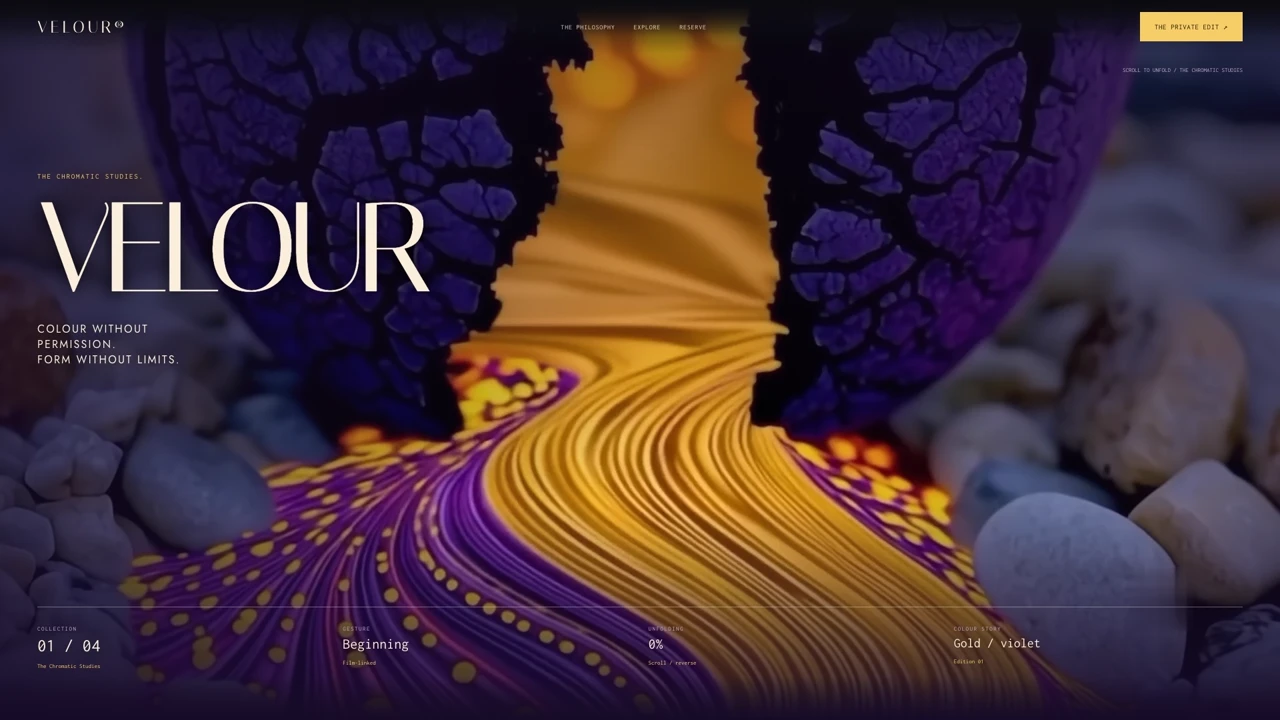
| VELOUR | Colour, sculptural fabric and a film-led reveal | Campaign launch or capsule collection | Give product details and the action enough space after the film. |
| PÉTALE | A single gown told through material, thread and fitting | Couture atelier or made-to-measure work | Replace fictional edition and fitting details with real terms. |
| MOIRÉ | Optical print, stark contrast and an editorial collection | Experimental fashion or print studio | Verify text contrast when pattern and type meet on mobile. |
| LIPSS — Violet Hour | A violet fashion daydream with chaptered transitions | Editorial campaign or occasionwear | Keep navigation and the product route clear beneath the story. |
These are different answers to the same design problem. VELOUR leads with atmosphere. PÉTALE stays close to one garment. MOIRÉ makes print the identity. LIPSS builds a mood across several scenes. Start with the story your customer needs to understand, then choose the effect.
What an animated fashion site still has to do
Show the item clearly
Film can establish texture and silhouette, but a buyer also needs stable views of the garment. Include a clear product image, colour or size options, materials, price, delivery terms and a direct route to the product page. Keep these facts in normal HTML so visitors can read them, select them and find them through search.
Give motion a job
Use a short reveal to show how fabric folds, a subtle transition to move from campaign mood to product detail, or a scroll chapter to explain craftsmanship. Do not make every section pin the page. A shopper who already knows the item should reach sizing, availability and checkout without replaying a long film.
Compose separately for mobile
A wide fashion film may place a model on the right and copy on the left. A phone crop can put both in the same space. Test the key frames at phone width, shorten headings, move text outside the media where needed and keep the main action visible. Make sure the first frame is sharp and the page remains usable with reduced motion enabled.
Free inspiration, premium templates and platform fit
A free page template can be enough for a lookbook or a first campaign. A working online store needs more: dependable navigation, product variants, a size guide, an accessible cart and an order system. Do not choose an ecommerce website template only because its entrance animation feels expensive. Check the actual shopping experience from a collection grid to a completed purchase.
Platform fit changes the decision. A Framer or Webflow template is easiest to customize in its native editor. A portable source export suits a team building with HTML or an AI coding tool. A full application project can support more complex sections but takes more setup. Compare the layout, font licences, included imagery and integration requirements before promising a boutique that the site is ready to sell.
The best fashion website template for a small apparel brand may be the quietest one: a responsive design with enough room for campaign imagery, readable product facts and a clear next step. Save the stronger animation effects for a collection launch where the movement tells a story.
Choose the format before you copy
A template marketplace may sell a Framer or Webflow project that you edit inside that platform. For example, the AMONO Framer listing and Techwear Webflow listing describe platform-specific fashion templates. Scrollhaus shows working website directions you can inspect first, then use the available source and build instructions in your chosen workflow. Those are different kinds of handoff; compare the format and licence, not only the thumbnail.
Before paying, open the preview on desktop and phone, scroll forward and back, confirm the final section is usable, and read what the entry actually includes. Our licensing checklist covers client work and media. The pricing page explains access periods, while the free collection lets you test the workflow.
A brief for adapting one direction
Keep the chosen page’s section order and scroll timing. Replace the demo brand, garment and copy with approved material. Put a stable product view, size guide, price and checkout link after the campaign sequence. Keep navigation, product details and the primary action usable on phones and with reduced motion. Check the first, middle and final frames against the live reference before launch.
Start by reproducing the source as supplied. Then change content, media and typography in separate passes. That makes it easier to spot when a new image crop or text reveal creates overlap. For a deeper implementation checklist, see cinematic website templates and performance for animated sites.
Questions before you publish
- Can a visitor see the garment without waiting for the whole film?
- Are price, sizing and delivery information correct and selectable?
- Does the hero stay readable at 390px width?
- Are all images, fonts and film cleared for commercial use?
- Does the final call to action connect to a real cart, form or booking service?
A strong fashion website can be dramatic and direct at the same time. Let the motion create desire; let the rest of the page help someone decide.
Frequently asked questions
Can I use these fashion examples as a real online store?
They are fictional design demonstrations. You can use the available source and build resources under the applicable licence, then connect your real catalogue, inventory, pricing, checkout and policies.
Do animated fashion websites work on mobile?
They can, but the composition must be tested at phone width. Keep product details and actions in readable HTML, check the video crop and provide a reduced-motion experience.
Is every fashion example a single HTML file?
No. Some Scrollhaus entries have portable HTML and others require a full-project handoff. Check the specific entry’s source format and dependencies before choosing it.
Explore animated website templates at Scrollhaus →
Need help with a template, account, or project? Email admin@scrollhaus.ai.