Website Design · 2026-10-06 · 6 min read
Animated Ecommerce Website Templates: Five Product Stories to Build From
A product should remain easy to understand and buy while the page moves. These five Scrollhaus examples show different ways to tell a product story, with a practical checklist for taking a cinematic demo into a real storefront.
Written by AmJ, founder of Scrollhaus, and edited by the Scrollhaus editorial team. Sources and methodology are documented in the article.
Key takeaways
Animated ecommerce website templates combine a product layout with motion: a scroll-driven reveal, changing materials, interactive details or a simple transition between product states. Choose one by the buying question it answers, then connect the design to your real commerce system. A beautiful demonstration is not automatically a working online store.
Disclosure: Scrollhaus publishes this guide and provides the examples below. They are fictional product demonstrations from our own library, not independent client results. No conversion uplift or sales performance is claimed. Catalogue availability and access are shown on the current library and pricing pages.
Five live examples of animated ecommerce website design
Open each working website to inspect the pacing. The useful comparison is what the animation communicates, whether product information stays readable, and how quickly a visitor can reach a buying decision.
| Example | Product story | What to inspect | Best use |
|---|---|---|---|
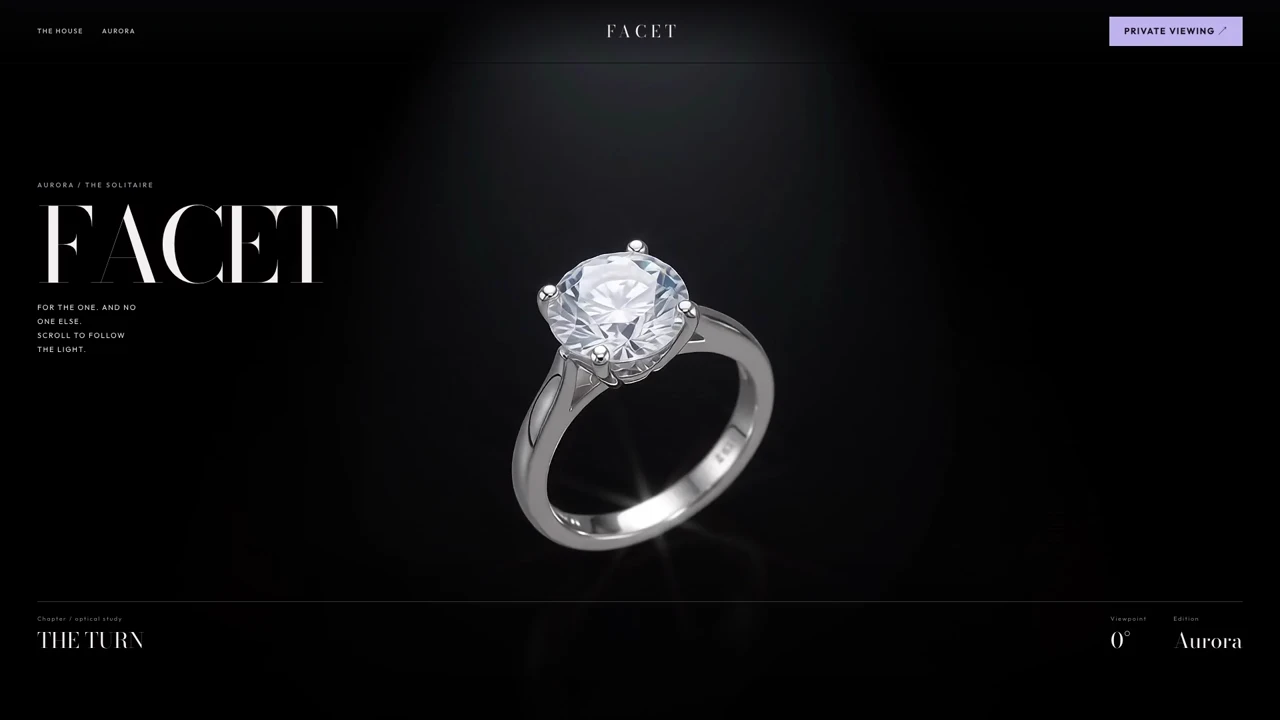
| FACET | An independent jeweller and a solitaire ring | Diamond detail, metal choices and the transition from spectacle to specifications | A considered purchase that needs material and craftsmanship evidence |
| CYMA One | A sculptural speaker and colour responding to sound | The relationship between the product, paint motion and technical readouts | A product launch where motion explains a distinctive feature |
| VARENN | A fashion jacket shown through a cinematic sequence | Silhouette, fabric detail and room around the model for copy | An editorial fashion collection or campaign landing page |
| LIPSS — Violet Hour | A violet beauty campaign | Colour continuity and typography as the scene changes | A single beauty product with a distinctive visual identity |
| AURELIS 88 | A luxury watch | Legibility against reflective surfaces and the handoff to product details | A premium accessory story that benefits from close inspection |
These examples are design starting points. Confirm the current export format before building. A portable HTML page and a full application project have different setup needs; neither should be treated as proof that inventory, tax, payment or fulfilment is already connected.
Choose the template around the buying question
Write down the uncertainty that keeps your customer from buying. For clothing it might be fit or fabric. For a speaker it might be size, connections or sound. For jewellery it might be metal, diamond characteristics or aftercare. Build the motion around one of those questions rather than adding movement to every section.
A short product turn can reveal shape. A close-up can show texture. A before-and-after interaction can explain a finish. A pinned scroll chapter can demonstrate an assembly or a transformation. Reserve an ordinary, readable section for specifications, dimensions, shipping, returns and the primary action.
Match the format to your commerce platform
If your store uses Shopify, a standalone HTML source is a reference and implementation starting point; it needs adaptation into your theme or storefront. For Webflow, confirm whether the purchased template includes the Ecommerce features you need. For an AI-built application, ask your builder to integrate with the commerce service you actually use. Do not ask it to invent a payment backend from a visual mock-up.
Check whether custom fonts, animation libraries and images are included in the licence. A template licence does not establish your rights to every third-party asset. Use your own product photography and truthful product claims before launch. Read the Scrollhaus licence and the original creator's terms for any external template.
Keep animation out of the checkout's way
Keep price, selected options and the buy action stable. When a visitor changes a finish or size, show the new state immediately and announce relevant price or availability changes. A subtle hover effect can confirm an interaction; an elaborate transition should not postpone the next step.
Scrolling should remain reversible. Test that a product sequence moves forward and backward, holds its final frame, and releases the visitor into the rest of the page. Provide an obvious way to skip a long cinematic chapter. On a phone, important detail and the call to action should fit without sideways scrolling.
Separate a scroll-scrubbed film from a looping background. A loop runs with time; a canvas image sequence selects frames from scroll progress. The second approach allows a precise relationship between text and product motion, but requires a loading strategy and careful memory use. See the canvas image-sequence tutorial for the implementation tradeoffs.
A copy-and-build brief for a real product page
Use the following brief after choosing a working reference. Replace the bracketed values with real information rather than asking a model to create product facts.
Adapt this source into a product landing page for [brand and product].
Preserve the tested scroll mechanism and section structure.
Replace demo claims with [approved copy, price and specifications].
Use [owned media URLs]; keep the product clear at every scroll position.
Keep price, variant selection and the primary action immediately usable.
Connect the buying action to [existing commerce service].
Show honest loading, unavailable and failed-checkout states.
Provide keyboard controls and a reduced-motion alternative.
Test at 1440x900 and 390x844; report any unsupported features.
Never claim an order was placed unless the commerce service confirms it.
Make the first build with one product and one clear action. Once the structure works, update brand colours, font, photography and copy in separate passes. This makes it easier to identify what broke if the animation drifts from the preview. Keep a known-good version of the original source.
Performance and SEO checks before publishing
Do not download every film or frame sequence at page load. Prioritize a sharp first view, then fetch media as its chapter approaches. Host large media separately from your application source. A content delivery network can improve delivery, but it does not repair excessive simultaneous downloads, inefficient frame decoding or a blocked main thread.
Reserve image and video dimensions so the layout remains stable. Keep product names, descriptions, pricing and specifications in HTML rather than baking all of them into a film. Google recommends meaningful page content and appropriate product structured data; use only details that match the visible page and real offer.
Test a cold mobile load, a fast scroll, a reverse scroll and an option change. Check reduced motion and keyboard operation. Measure actual loading and interaction behaviour; the fact that a demo looks smooth on your laptop does not establish the experience on customers' devices.
Do animated templates improve sales?
Motion can help a visitor understand a product, but it does not guarantee conversions. Measure completed purchases, product-option interactions and checkout failures against a simpler version. If visitors spend longer watching but fewer finish checkout, the visual treatment needs revision.
For a new brand, begin with clear product information, trustworthy fulfilment details and a working purchase flow. Add storytelling where it supports that foundation. Browse the website library, then compare the current plans and test an available free build before committing to a larger implementation.
Sources and further reading
- Google Search Central: Product structured data
- web.dev: Core Web Vitals thresholds
- W3C: Pause, Stop, Hide
- Website animation templates with source code
- Keep animation fast without hiding the first view
Plan your access and project rights
Compare what each Scrollhaus plan includes, then check source and media permissions for client work. For the complete visual workflow, read the cinematic website template buying guide.
Frequently asked questions
Does an animated ecommerce template include checkout?
Not necessarily. A visual product demo must be connected to a real commerce system for checkout, inventory, tax and fulfilment. Verify the export and included integrations before choosing a template.
Can I use an HTML template in Shopify or an AI builder?
HTML can serve as a design and implementation starting point. Shopify requires adaptation into its theme or storefront; an AI builder still needs the right dependencies, assets and commerce integration.
What is the difference between a video background and scroll animation?
A video background plays over time. A scroll-driven sequence selects its frame from the visitor’s scroll position, making product movement and copy follow the same progress.
Explore animated website templates at Scrollhaus →
Need help with a template, account, or project? Email admin@scrollhaus.ai.