Website Motion · 2026-10-17 · 5 min read
Spline Alternative: Code-First 3D Website Templates vs Spline 3D Design
Spline changed 3D web design. A designer can build a scene, add hover states and publish it without writing code. So why look for a Spline alternative at all? Usually it comes down to page weight, control over interaction, or wanting the 3D to be part of the code base rather than an embed.
Written by Amanjot Singh, founder of Scrollhaus, and edited by the Scrollhaus editorial team. Sources and methodology are documented in the article.
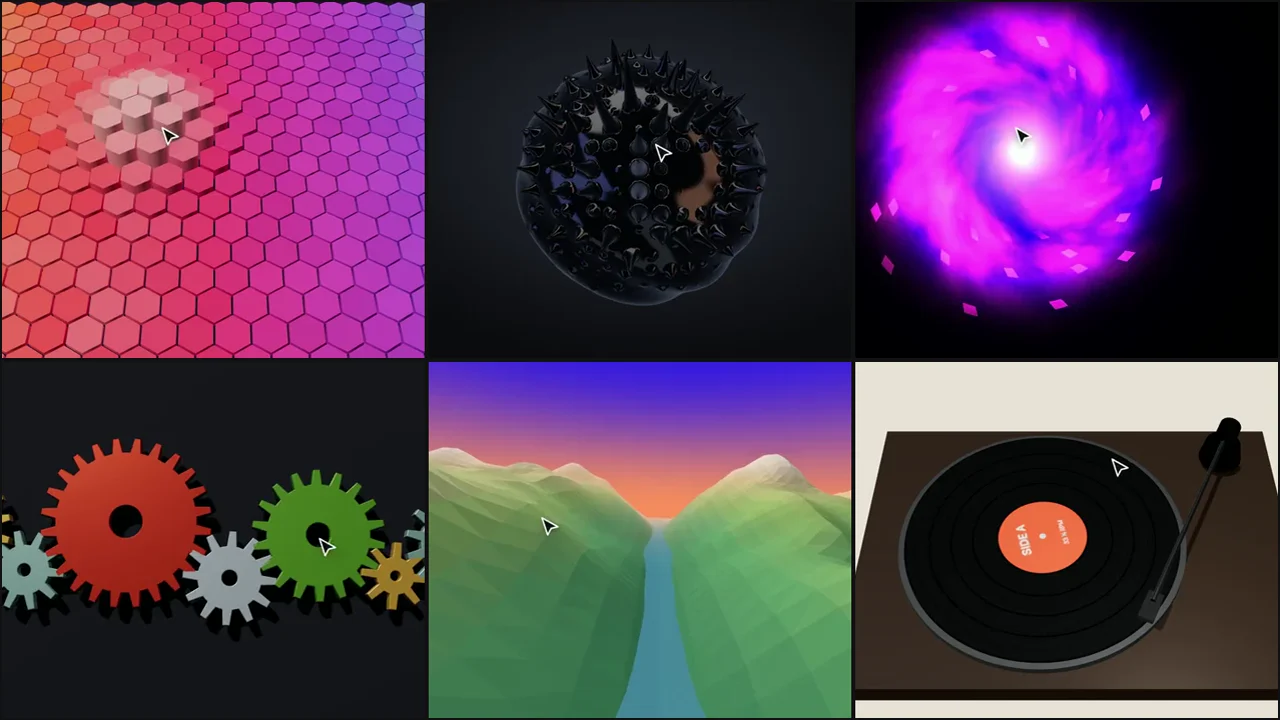
Quick answer: use Spline when a designer needs to build and tweak a 3D scene visually. Use a code-first three.js template when you want the smallest possible embed, full control over cursor interaction, and code that lives in your own project. Scrollhaus has 75 original interactive 3D templates that paste in as one snippet. Scrollhaus is not affiliated with Spline.
What Spline 3D does well
Spline design is visual: you model, light and animate in a browser editor, then export or embed. States and events (hover, click, scroll) are set up with a panel instead of code. For teams without a WebGL developer, that is a big deal, and it is why Spline is one of the most searched 3D tools for the web.
Why teams look for a Spline alternative
Page weight
A Spline embed loads its runtime plus your scene file. For a simple hero that can be more than the rest of the page combined. A hand-written three.js scene loads three.js (or only the parts it uses) and a few kilobytes of your own code. Most of our templates are procedural: the shapes are generated in code, so there is no model file to download at all.
Interaction you can read and change
Spline interactions are configured in the editor. In code you can do things that are awkward in a panel: real physics like the Newton’s cradle or the gear train, a GPU water simulation like the image ripple, or a magnetic field that thousands of iron filings follow.
SEO and accessibility
The 3D should decorate the page, not replace it. With a snippet that sits behind a normal HTML headline, search engines and screen readers still get your text. Our templates are designed to sit inside a hero rather than take over the whole document.
Ownership
A snippet in your repository is versioned with everything else. There is no external scene URL to keep alive and no editor account needed to make a small change.
Spline vs three.js templates at a glance
| Spline | Code-first three.js templates | |
|---|---|---|
| Build | Visual editor | Edit settings at the top of a snippet |
| Interaction | States and events in a panel | Any logic: physics, shaders, simulations |
| Load | Runtime plus scene file | three.js plus a few KB of code |
| Hosting | Spline embed or export | Lives in your page or repo |
| Best for | Designers building custom scenes | Fast, interactive hero effects |
Popular Spline-style effects, built in code
- Glass and chrome: the glass lens headline, the ferrofluid blob and the rainy window.
- Playful objects: the honeycomb field, bubble wrap and the vinyl turntable.
- Particles and shaders: the portal vortex, constellation maker and the sea of clouds.
- Physics: magnet orbs, wind chimes and the spacetime grid.
How to add a 3D template to a page
- Open a template and move your cursor over the live preview.
- Copy the snippet: one
<div>and one module script. - Paste it into a Code or Embed element in Webflow, Framer or WordPress, or straight into an HTML page.
- Change colours and speeds in the settings block at the top.
Every template pauses when it scrolls out of view, caps its pixel ratio, and runs a gentle demo when nobody is moving the mouse, so it never looks frozen. For more on performance, read our guide to interactive 3D website templates.
When to stay with Spline
If your scene is a custom model that a designer will keep editing, Spline is the better tool. The two also mix well: a Spline scene for a product page, and a lightweight code template for a hero or a section break where speed matters most.
Frequently asked questions
What is the best Spline alternative for websites?
For interactive hero effects, code-first three.js templates are the lightest option. For visual scene building, Spline remains the easiest editor; Blender plus three.js is the most flexible.
Is Spline 3D bad for SEO?
Not by itself, but a full-page embed can push your text out of view and add load time. Keep headlines as real HTML and use 3D as a background or accent.
Do I need to know three.js to use these templates?
No. Each template has a short settings block at the top for colours, sizes and speeds, and the rest works as pasted.
Can I use the templates in Webflow or Framer?
Yes. Paste the snippet into an Embed or Code element. It is one div and one module script.
Is Scrollhaus affiliated with Spline?
No. Scrollhaus is independent. These templates are original three.js code.
Explore animated website templates at Scrollhaus →
Need help with a template, account, or project? Email admin@scrollhaus.ai.